> ## Documentation Index
> Fetch the complete documentation index at: https://docs.nrev.ai/llms.txt
> Use this file to discover all available pages before exploring further.
# AI Scorer
> Quickly score every row in your dataset based on your own rules—so you always know which deals, leads, or accounts deserve the highest marks.
## What It Does
* **Custom Scoring:** Assign a numerical score to each row using your own plain-English rules.
* **Optional “Why?”:** Flip on the reasoning switch for one-line explanations behind each score.
* **Seamless Output:** Returns your original table + a `SCORE` column (and `REASON` column if enabled).
***
## 🏁 Getting Started
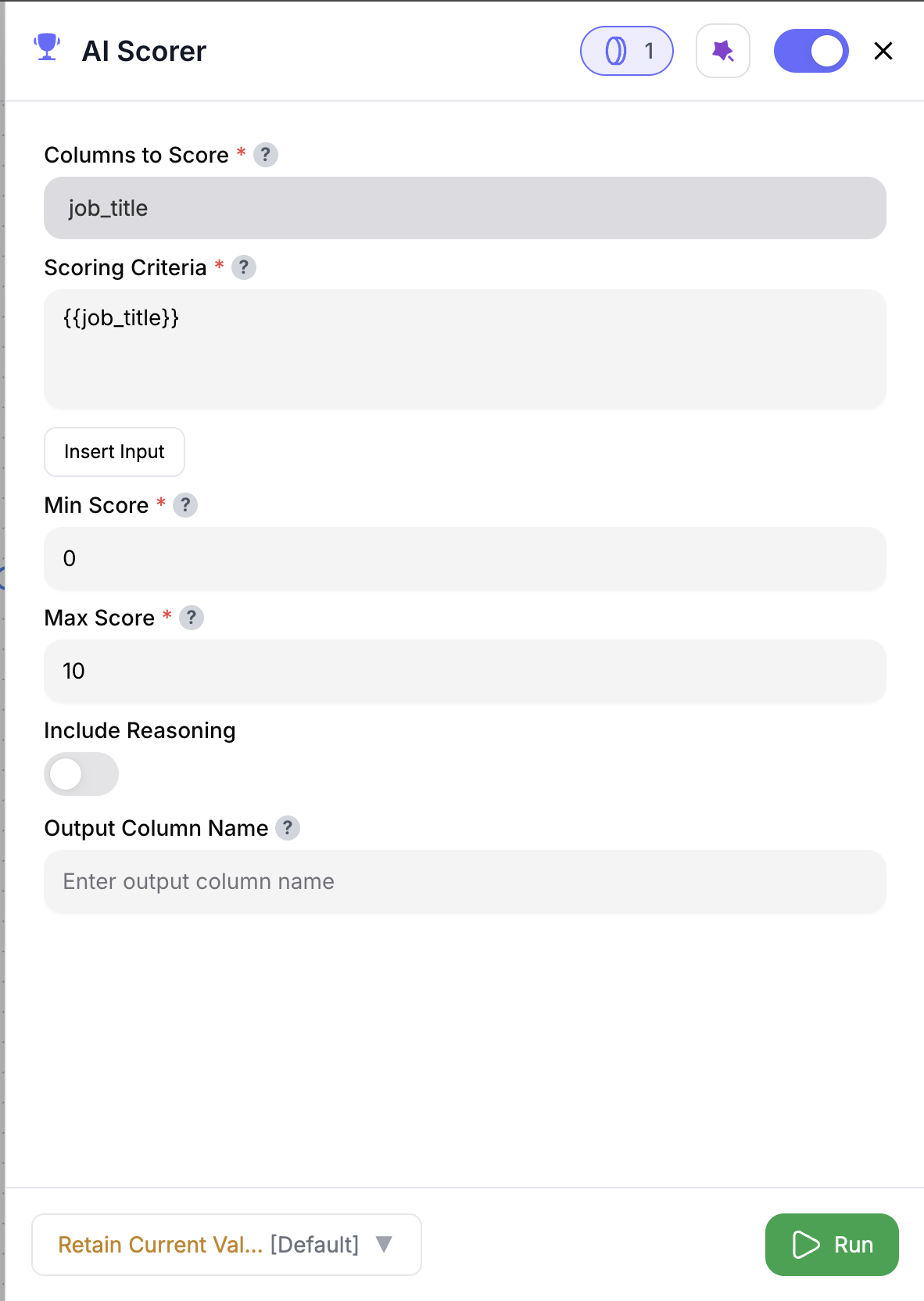 Drag & drop the **AI Scorer** node into your flow.
Choose the columns to score and define your scoring criteria.
Set your **Min Score** and **Max Score** values.
(Optional) Turn on **Include Reasoning** to get short explanations.
Rename the output column if needed (default: `SCORE`).
Hit **Run**—your table will now include `SCORE` (and `REASON` if enabled).
***
## Inputs
### 🛠️ Required Fields
* **Columns to Score (✅)**\
Select which columns the AI should evaluate. Example: `region`, `engagement_score`, `plan_type`.
* **Scoring Criteria (✅)**\
Write your rules in plain English. Example:\
`"Score = max if Region = Americas AND Date is within last 30 days"`
* **Min Score (✅)**\
The lowest value allowed (e.g., `0` or `1`).
* **Max Score (✅)**\
The highest possible score (e.g., `100`).
### 🎯 Optional Fields
* **Include Reasoning (⚪️)**\
Adds a `REASON` column that explains why each score was assigned.
* **Output Column Name (⚪️)**\
Rename the `SCORE` column to fit your use case (e.g., `FitScore`, `RiskScore`).
***
## Output
You’ll get your original table with:
* `SCORE` (numerical output)
* `REASON` (optional one-liner explanation)
***
## How It Works
1. Extracts the selected fields for each row
2. Combines them with your natural-language criteria
3. Sends each prompt to the AI engine
4. Receives a numeric score (and reasoning if toggled)
5. Appends new output columns to your dataset
***
## 🚀 Use Cases & Prompts
| Use Case | Prompt Example |
| --------------------------- | ------------------------------------------------------------------ |
| Prioritize Enterprise Leads | “Score = max if PlanType = 'Enterprise' AND EngagementScore > 75.” |
| Churn Risk Scoring | “Score = HealthScore × 0.6 − ChurnRiskScore × 0.4.” |
| Flag At-Risk Accounts | “Score = max if IsActive = false AND DaysSinceLastLogin > 30.” |
| MRR-Based Fit Score | “Score by descending MonthlyRecurringRevenue.” |
| Urgency-Based Routing | “Score = max if RenewalDate is within next 14 days.” |
***
## ✨ Pro Tips
Use **2–3 key columns** for faster, more focused scoring.
Toggle **Include Reasoning** to generate helpful notes for sales, CX, or ops to review.
**Start small:** Test scoring logic on a sample table before deploying at scale.
***
## ⚠️ Important Considerations
Every row processed consumes **1 credit**.
Poor or null data can reduce scoring accuracy. Clean your input before running.
Overly vague instructions may lead to default or uniform scoring. Be specific with thresholds and logic.
***
## 🛠 Troubleshooting & Gotchas
| Symptom | What’s Going On | Quick Fix |
| ----------------------- | -------------------------------- | ---------------------------------------- |
| All scores = Min or Max | Criteria too strict or too broad | Refine your logic to use tighter filters |
| Empty `SCORE` values | Nulls in required columns | Pre-clean data or add defaults upstream |
| REASON column missing | Reasoning toggle not enabled | Turn on **Include Reasoning** in config |
***
## 📝 FAQ
Yes — for example, score for Fit first, then pass that into a Risk or Value scorer.
You can duplicate the node or save the flow as a template for later reuse.
Absolutely — the AI can reason across both types.
***
## 💰 Pricing
| Action | Credit Cost |
| -------------- | ----------- |
| Per row scored | 1 credit |
Only rows successfully scored are charged.
***
Drag & drop the **AI Scorer** node into your flow.
Choose the columns to score and define your scoring criteria.
Set your **Min Score** and **Max Score** values.
(Optional) Turn on **Include Reasoning** to get short explanations.
Rename the output column if needed (default: `SCORE`).
Hit **Run**—your table will now include `SCORE` (and `REASON` if enabled).
***
## Inputs
### 🛠️ Required Fields
* **Columns to Score (✅)**\
Select which columns the AI should evaluate. Example: `region`, `engagement_score`, `plan_type`.
* **Scoring Criteria (✅)**\
Write your rules in plain English. Example:\
`"Score = max if Region = Americas AND Date is within last 30 days"`
* **Min Score (✅)**\
The lowest value allowed (e.g., `0` or `1`).
* **Max Score (✅)**\
The highest possible score (e.g., `100`).
### 🎯 Optional Fields
* **Include Reasoning (⚪️)**\
Adds a `REASON` column that explains why each score was assigned.
* **Output Column Name (⚪️)**\
Rename the `SCORE` column to fit your use case (e.g., `FitScore`, `RiskScore`).
***
## Output
You’ll get your original table with:
* `SCORE` (numerical output)
* `REASON` (optional one-liner explanation)
***
## How It Works
1. Extracts the selected fields for each row
2. Combines them with your natural-language criteria
3. Sends each prompt to the AI engine
4. Receives a numeric score (and reasoning if toggled)
5. Appends new output columns to your dataset
***
## 🚀 Use Cases & Prompts
| Use Case | Prompt Example |
| --------------------------- | ------------------------------------------------------------------ |
| Prioritize Enterprise Leads | “Score = max if PlanType = 'Enterprise' AND EngagementScore > 75.” |
| Churn Risk Scoring | “Score = HealthScore × 0.6 − ChurnRiskScore × 0.4.” |
| Flag At-Risk Accounts | “Score = max if IsActive = false AND DaysSinceLastLogin > 30.” |
| MRR-Based Fit Score | “Score by descending MonthlyRecurringRevenue.” |
| Urgency-Based Routing | “Score = max if RenewalDate is within next 14 days.” |
***
## ✨ Pro Tips
Use **2–3 key columns** for faster, more focused scoring.
Toggle **Include Reasoning** to generate helpful notes for sales, CX, or ops to review.
**Start small:** Test scoring logic on a sample table before deploying at scale.
***
## ⚠️ Important Considerations
Every row processed consumes **1 credit**.
Poor or null data can reduce scoring accuracy. Clean your input before running.
Overly vague instructions may lead to default or uniform scoring. Be specific with thresholds and logic.
***
## 🛠 Troubleshooting & Gotchas
| Symptom | What’s Going On | Quick Fix |
| ----------------------- | -------------------------------- | ---------------------------------------- |
| All scores = Min or Max | Criteria too strict or too broad | Refine your logic to use tighter filters |
| Empty `SCORE` values | Nulls in required columns | Pre-clean data or add defaults upstream |
| REASON column missing | Reasoning toggle not enabled | Turn on **Include Reasoning** in config |
***
## 📝 FAQ
Yes — for example, score for Fit first, then pass that into a Risk or Value scorer.
You can duplicate the node or save the flow as a template for later reuse.
Absolutely — the AI can reason across both types.
***
## 💰 Pricing
| Action | Credit Cost |
| -------------- | ----------- |
| Per row scored | 1 credit |
Only rows successfully scored are charged.
***
Embed smart scoring anywhere in your flow — and turn raw records into ranked, reasoned insights that move your GTM faster. 📊⚡️