> ## Documentation Index
> Fetch the complete documentation index at: https://docs.nrev.ai/llms.txt
> Use this file to discover all available pages before exploring further.
# Ask AI
> Add AI to your workflow with flexible prompts and structured output. Great for classification, insights, and customer feedback analysis.
## What It Does
* **Custom Prompting:** Generate AI responses based on any prompt and dataset—personalized row by row.
* **Structured or Free-Form:** Choose between natural text or JSON-style structured output.
* **Supports Web Search:** Enable external search for richer answers on supported models.
* **Column Auto-Mapping:** Dynamically maps fields and avoids name collisions for smooth output.
* **Model Flexibility:** Run on multiple OpenAI models including GPT-4o and GPT-4o-mini.
***
## 🏁 Getting Started
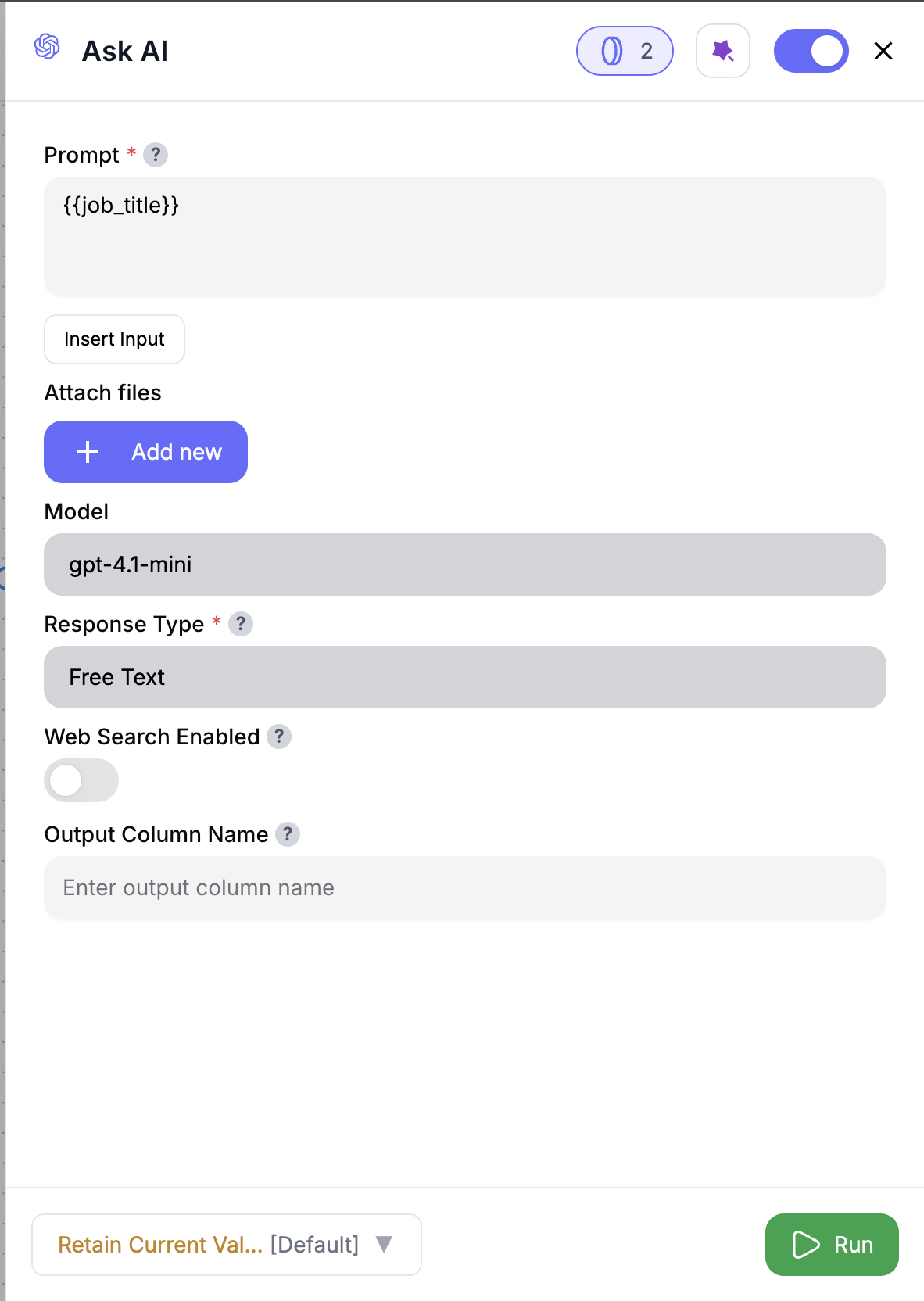 Drag & drop the **Ask AI** node into your workflow.
Use the **Insert Input** button or `@column_name` to reference values from your input.
Choose from supported models like `gpt-4o-mini` (default) or `gpt-4o`.
Select **Free Text** (default) or **Structured Output** depending on your needs.
For structured output, define expected fields using a simple JSON schema.
Click **Run** to generate AI responses for each row in your input dataset.
***
## Inputs
### 🛠️ Required Fields
* **Prompt (✅)**\
Write your instruction using `@column_name` references or Insert Input.\
*Why it matters:* The AI uses this row-by-row to tailor each result.
* **Model (✅)**\
Choose between `gpt-4o-mini` (default), `gpt-4o`, or any other supported OpenAI model.\
*Why it matters:* Affects quality, speed, and credit cost.
* **Response Type (✅)**\
Choose `free_text` (default) or `structured_output`.\
*Why it matters:* Controls whether you get one column (text) or multiple (JSON→columns).
* **Web Search Enabled (✅)**\
Toggle On/Off for real-time context injection on supported models.\
*Why it matters:* Improves freshness of answers but adds cost + latency.
### 🎯 Optional Fields
* **Response JSON (⚪️)**\
Required if `structured_output` is selected. Use sample JSON to define column layout.
* **Output Column Name (⚪️)**\
Applies only to free-text output. Default is `RESPONSE`.
We also support Latest OpenAI model- gpt-5.1!!
***
## Output
* **Free Text Output**
* Adds one column: `RESPONSE` (or renamed output)
* **Structured Output**
* Adds one column for each key in your JSON schema
***
## How It Works
1. Injects column values dynamically from each row into your prompt
2. Sends request to your selected model (with web search if enabled)
3. Parses output as free text or structured JSON
4. Adds result(s) to each row of your table
5. Automatically renames fields if name conflicts occur
***
## 🚀 Example Use Cases & Prompts
| Use Case | Prompt |
| -------------------- | --------------------------------------------------------------------------------- |
| Product Suggestions | "Suggest products for @customer\_name based on their history: @purchase\_history" |
| Feedback Sentiment | "Analyze sentiment for @customer\_name based on: @feedback" |
| Lead Scoring Summary | "Summarize activity for @lead\_name and recommend next step." |
| Job Title Classifier | "Classify job title into Sales, Marketing, or Engineering: @title" |
| Category Mapping | "Assign a product category to this item: @product\_name" |
***
## ✨ Pro Tips
Use **Insert Input** to pull in dynamic row data — it's safer than typing and avoids name mismatches.
**Run a sample first.** Validate your prompt on 5–10 rows before scaling to hundreds.
Use `structured_output` if you want reliable, named columns you can filter, score, or export later.
***
## ⚠️ Important Considerations
Missing or incorrect column references = blank output. Use `@column_name` or Insert Input to avoid issues.
Web Search may increase latency and credit use — enable only when external context is truly needed.
If `structured_output` is selected, the **Response JSON** schema is required — it defines what columns to return.
Field collisions are resolved automatically using suffixes like `_1`, `_2`, etc.
Not all models offer websearch and structured output. Check model capabilities before configuring.
***
## 🛠 Troubleshooting & Gotchas
| Symptom | Likely Cause | Quick Fix |
| ---------------------- | ---------------------------------- | ---------------------------------------------- |
| No output generated | Missing column in prompt | Use Insert Input or double-check `@references` |
| All rows = same answer | Static prompt with no dynamic data | Add `@column_name` to personalize per row |
| Slower than expected | Web search enabled | Turn off unless needed |
| Output columns missing | Missing or malformed JSON schema | Add a valid JSON schema |
***
## 📝 FAQ
Yes — chain as many as you'd like for layered classification, insights, or scoring.
Not in the same node. Use separate nodes if you need both types.
The row is preserved, but the output column will show an error message.
***
## 💰 Pricing
Ask AI is billed per processed row:
| Model | Credits / Row | Notes |
| ------------ | ------------- | ------------------------------- |
| GPT-5.1 | 5 | Most advanced, top reasoning |
| GPT-5 | 5 | Near-frontier intelligence |
| GPT-5 mini | 3 | Efficient, strong reasoning |
| GPT-5 nano | 2 | Ultra-light, fast responses |
| GPT-4.1 | 3 | Balanced performance |
| GPT-4.1 mini | 2 | Lightweight, optimized |
| GPT-4.1 nano | 1 | Very fast, minimal compute |
| GPT-o3 | 4 | Legacy model, stable output |
| GPT-o4 mini | 4 | Improved mini-tier model |
| gpt-4o-mini | 1 | Fast, lightweight |
| gpt-4o | 4 | Premium model, deeper reasoning |
Each `Web Search` toggle adds **+2 credits/row** to your base cost.
***
Drag & drop the **Ask AI** node into your workflow.
Use the **Insert Input** button or `@column_name` to reference values from your input.
Choose from supported models like `gpt-4o-mini` (default) or `gpt-4o`.
Select **Free Text** (default) or **Structured Output** depending on your needs.
For structured output, define expected fields using a simple JSON schema.
Click **Run** to generate AI responses for each row in your input dataset.
***
## Inputs
### 🛠️ Required Fields
* **Prompt (✅)**\
Write your instruction using `@column_name` references or Insert Input.\
*Why it matters:* The AI uses this row-by-row to tailor each result.
* **Model (✅)**\
Choose between `gpt-4o-mini` (default), `gpt-4o`, or any other supported OpenAI model.\
*Why it matters:* Affects quality, speed, and credit cost.
* **Response Type (✅)**\
Choose `free_text` (default) or `structured_output`.\
*Why it matters:* Controls whether you get one column (text) or multiple (JSON→columns).
* **Web Search Enabled (✅)**\
Toggle On/Off for real-time context injection on supported models.\
*Why it matters:* Improves freshness of answers but adds cost + latency.
### 🎯 Optional Fields
* **Response JSON (⚪️)**\
Required if `structured_output` is selected. Use sample JSON to define column layout.
* **Output Column Name (⚪️)**\
Applies only to free-text output. Default is `RESPONSE`.
We also support Latest OpenAI model- gpt-5.1!!
***
## Output
* **Free Text Output**
* Adds one column: `RESPONSE` (or renamed output)
* **Structured Output**
* Adds one column for each key in your JSON schema
***
## How It Works
1. Injects column values dynamically from each row into your prompt
2. Sends request to your selected model (with web search if enabled)
3. Parses output as free text or structured JSON
4. Adds result(s) to each row of your table
5. Automatically renames fields if name conflicts occur
***
## 🚀 Example Use Cases & Prompts
| Use Case | Prompt |
| -------------------- | --------------------------------------------------------------------------------- |
| Product Suggestions | "Suggest products for @customer\_name based on their history: @purchase\_history" |
| Feedback Sentiment | "Analyze sentiment for @customer\_name based on: @feedback" |
| Lead Scoring Summary | "Summarize activity for @lead\_name and recommend next step." |
| Job Title Classifier | "Classify job title into Sales, Marketing, or Engineering: @title" |
| Category Mapping | "Assign a product category to this item: @product\_name" |
***
## ✨ Pro Tips
Use **Insert Input** to pull in dynamic row data — it's safer than typing and avoids name mismatches.
**Run a sample first.** Validate your prompt on 5–10 rows before scaling to hundreds.
Use `structured_output` if you want reliable, named columns you can filter, score, or export later.
***
## ⚠️ Important Considerations
Missing or incorrect column references = blank output. Use `@column_name` or Insert Input to avoid issues.
Web Search may increase latency and credit use — enable only when external context is truly needed.
If `structured_output` is selected, the **Response JSON** schema is required — it defines what columns to return.
Field collisions are resolved automatically using suffixes like `_1`, `_2`, etc.
Not all models offer websearch and structured output. Check model capabilities before configuring.
***
## 🛠 Troubleshooting & Gotchas
| Symptom | Likely Cause | Quick Fix |
| ---------------------- | ---------------------------------- | ---------------------------------------------- |
| No output generated | Missing column in prompt | Use Insert Input or double-check `@references` |
| All rows = same answer | Static prompt with no dynamic data | Add `@column_name` to personalize per row |
| Slower than expected | Web search enabled | Turn off unless needed |
| Output columns missing | Missing or malformed JSON schema | Add a valid JSON schema |
***
## 📝 FAQ
Yes — chain as many as you'd like for layered classification, insights, or scoring.
Not in the same node. Use separate nodes if you need both types.
The row is preserved, but the output column will show an error message.
***
## 💰 Pricing
Ask AI is billed per processed row:
| Model | Credits / Row | Notes |
| ------------ | ------------- | ------------------------------- |
| GPT-5.1 | 5 | Most advanced, top reasoning |
| GPT-5 | 5 | Near-frontier intelligence |
| GPT-5 mini | 3 | Efficient, strong reasoning |
| GPT-5 nano | 2 | Ultra-light, fast responses |
| GPT-4.1 | 3 | Balanced performance |
| GPT-4.1 mini | 2 | Lightweight, optimized |
| GPT-4.1 nano | 1 | Very fast, minimal compute |
| GPT-o3 | 4 | Legacy model, stable output |
| GPT-o4 mini | 4 | Improved mini-tier model |
| gpt-4o-mini | 1 | Fast, lightweight |
| gpt-4o | 4 | Premium model, deeper reasoning |
Each `Web Search` toggle adds **+2 credits/row** to your base cost.
***
Add Ask AI to your workflow and turn raw data into answers, summaries, and classifications — all without switching tools. ⚡🧠