> ## Documentation Index
> Fetch the complete documentation index at: https://docs.nrev.ai/llms.txt
> Use this file to discover all available pages before exploring further.
# AI Ranker
> Quickly score every row in your dataset based on your own rules—so you always know which deals, leads, or accounts to tackle first.
## What It Does
* **Custom Ranking**: Assign a rank to each row using plain-English logic—no code or SQL required
* **Optional “Why?”**: Flip on reasoning to include concise rank explanations
* **Flexible Inputs**: Rank by any column(s)—Mix and match GTM, firmographic, or behavioral data
* **Clean Output**: Returns your original table + a `RANK` column (and optional `REASON`)
***
## 🏁 Getting Started
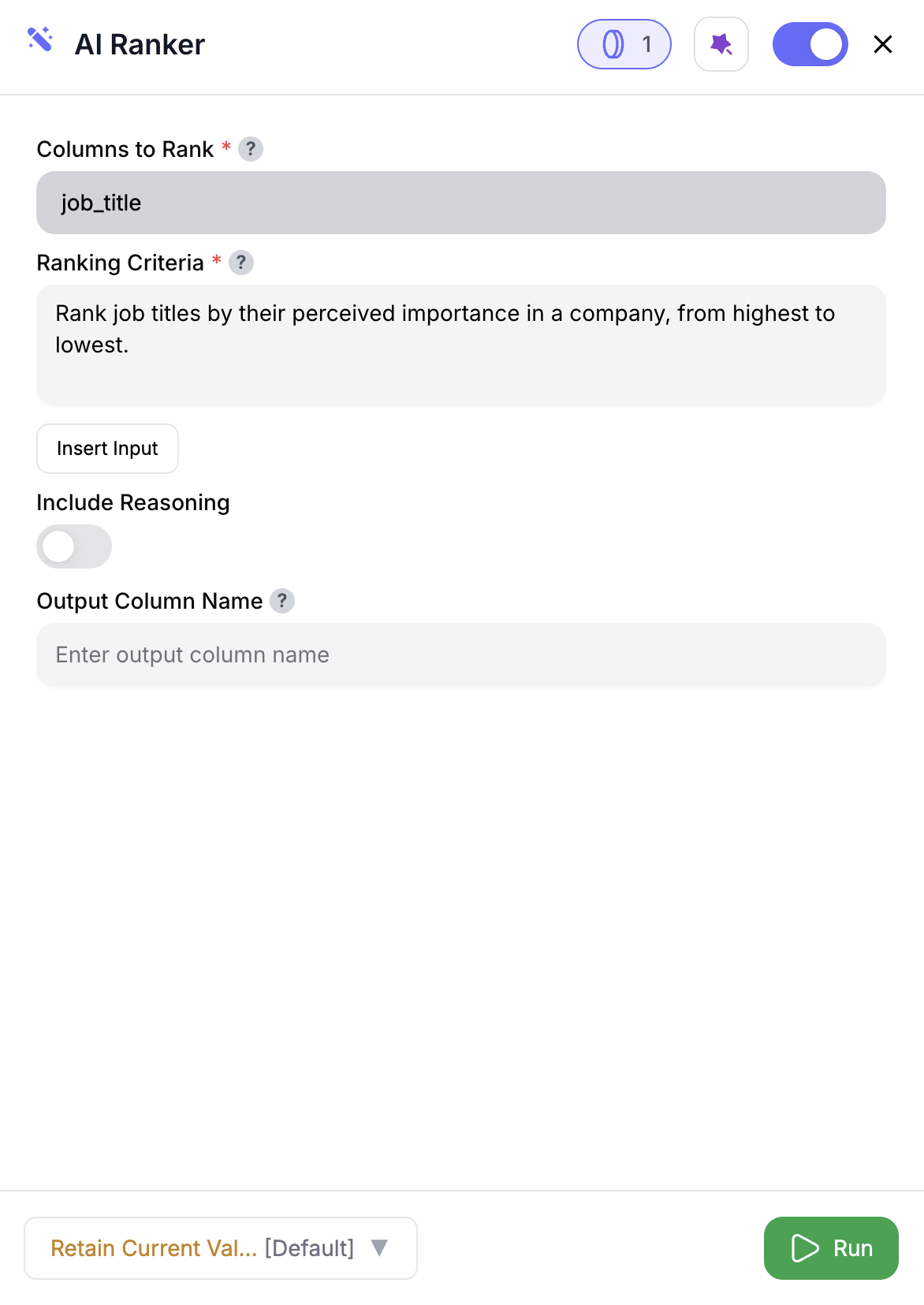 Drag the **AI Ranker** node into your flow.
Pick the fields to use for ranking—like `@Close Date`, `@Deal Size`, or `@Engagement Score`.
Define your logic in plain English (e.g. “Rank by soonest close date.”)
Turn on **Include Reasoning** to explain each rank.
Choose a name (default is `RANK`) to avoid naming conflicts.
Click **Run**—you’ll get `RANK` and optionally `REASON` added to each row.
***
## Inputs
### 🛠️ Required Fields
* **Columns to Rank (✅)**\
Select the fields that drive ranking—these values get sent to the model for logic evaluation.
* **Ranking Criteria (✅)**\
Describe your rules in plain English.\
Example: “Rank by highest Engagement Score, then by newest Lead Source.”
### 🎯 Optional Fields
* **Include Reasoning (⚪️)**\
Adds a second column (`REASON`) explaining why the rank was assigned.\
*Adds 1 extra credit per row.*
* **Output Column Name (⚪️)**\
Defaults to `RANK`. Use a custom name like `PriorityRank` to avoid name collisions.
***
## Output
* `RANK` – Numerical value based on your rules (lower = higher priority)
* `REASON` (optional) – Short explanation for each rank
The lower the number, the higher the priority. (1 = top-ranked)
***
## 🚀 Use Cases & Prompts
| Use Case | Example Prompt |
| ----------------------- | --------------------------------------------------------------- |
| Pipeline Prioritization | “Rank open opps by soonest Close Date, then highest Deal Size.” |
| Lead Scoring | “Rank leads by engagement + firmographic fit.” |
| Account Segmentation | “Rank accounts by ARR and likelihood to close this quarter.” |
| Inventory Optimization | “Rank SKUs by highest margin, then by age.” |
***
## ✨ Pro Tips
Keep your **ranking criteria laser-specific**—vague logic yields noisy ranks.
Limit to 2–3 **high-signal columns** like `@Intent Score` or `@ACV`—clearer signal = better ranks.
Fill missing values before ranking—**blanks can skew outputs silently**.
Use a custom output column name (`@DealRank`, `@PriorityScore`) to make downstream logic cleaner.
***
## ⚠️ Important Considerations
**Ranking large datasets** may take longer and use more credits.
Missing or malformed input values **can throw off the model's judgment**.
If your rules are too broad, **many rows may get tied ranks**—tighten your logic.
***
## 🛠 Troubleshooting & Gotchas
| Symptom | Likely Cause | Quick Fix |
| --------------------------- | ---------------------- | ---------------------------------------------------- |
| All ranks are the same | Criteria is too vague | Add more specific thresholds or secondary conditions |
| Blank ranks | Nulls in input columns | Fill or filter missing values ahead of this node |
| Flow stalls on large tables | Too many rows at once | Pre-filter or chunk into smaller batches |
***
## 📝 FAQ
Absolutely. Just reference them all in your criteria (e.g., “Rank by ARR and Close Date”).
Yes — score first with AI Scorer, then rank using that column.
The model may assign the same rank. Use more precise conditions to break ties.
***
## 💰 Pricing
| Action | Credits / Row |
| -------------- | ------------- |
| Rank only | 1 |
| With Reasoning | 2 |
Each row you rank consumes credits. Reasoning adds +1 credit per row.
***
Drag the **AI Ranker** node into your flow.
Pick the fields to use for ranking—like `@Close Date`, `@Deal Size`, or `@Engagement Score`.
Define your logic in plain English (e.g. “Rank by soonest close date.”)
Turn on **Include Reasoning** to explain each rank.
Choose a name (default is `RANK`) to avoid naming conflicts.
Click **Run**—you’ll get `RANK` and optionally `REASON` added to each row.
***
## Inputs
### 🛠️ Required Fields
* **Columns to Rank (✅)**\
Select the fields that drive ranking—these values get sent to the model for logic evaluation.
* **Ranking Criteria (✅)**\
Describe your rules in plain English.\
Example: “Rank by highest Engagement Score, then by newest Lead Source.”
### 🎯 Optional Fields
* **Include Reasoning (⚪️)**\
Adds a second column (`REASON`) explaining why the rank was assigned.\
*Adds 1 extra credit per row.*
* **Output Column Name (⚪️)**\
Defaults to `RANK`. Use a custom name like `PriorityRank` to avoid name collisions.
***
## Output
* `RANK` – Numerical value based on your rules (lower = higher priority)
* `REASON` (optional) – Short explanation for each rank
The lower the number, the higher the priority. (1 = top-ranked)
***
## 🚀 Use Cases & Prompts
| Use Case | Example Prompt |
| ----------------------- | --------------------------------------------------------------- |
| Pipeline Prioritization | “Rank open opps by soonest Close Date, then highest Deal Size.” |
| Lead Scoring | “Rank leads by engagement + firmographic fit.” |
| Account Segmentation | “Rank accounts by ARR and likelihood to close this quarter.” |
| Inventory Optimization | “Rank SKUs by highest margin, then by age.” |
***
## ✨ Pro Tips
Keep your **ranking criteria laser-specific**—vague logic yields noisy ranks.
Limit to 2–3 **high-signal columns** like `@Intent Score` or `@ACV`—clearer signal = better ranks.
Fill missing values before ranking—**blanks can skew outputs silently**.
Use a custom output column name (`@DealRank`, `@PriorityScore`) to make downstream logic cleaner.
***
## ⚠️ Important Considerations
**Ranking large datasets** may take longer and use more credits.
Missing or malformed input values **can throw off the model's judgment**.
If your rules are too broad, **many rows may get tied ranks**—tighten your logic.
***
## 🛠 Troubleshooting & Gotchas
| Symptom | Likely Cause | Quick Fix |
| --------------------------- | ---------------------- | ---------------------------------------------------- |
| All ranks are the same | Criteria is too vague | Add more specific thresholds or secondary conditions |
| Blank ranks | Nulls in input columns | Fill or filter missing values ahead of this node |
| Flow stalls on large tables | Too many rows at once | Pre-filter or chunk into smaller batches |
***
## 📝 FAQ
Absolutely. Just reference them all in your criteria (e.g., “Rank by ARR and Close Date”).
Yes — score first with AI Scorer, then rank using that column.
The model may assign the same rank. Use more precise conditions to break ties.
***
## 💰 Pricing
| Action | Credits / Row |
| -------------- | ------------- |
| Rank only | 1 |
| With Reasoning | 2 |
Each row you rank consumes credits. Reasoning adds +1 credit per row.
***
Prioritize like a pro—drop AI Ranker into your flow and always know what to tackle first. 🚦📊