> ## Documentation Index
> Fetch the complete documentation index at: https://docs.nrev.ai/llms.txt
> Use this file to discover all available pages before exploring further.
# Summariser
> Automatically generate concise summaries from long-form text using AI—row by row or grouped by key fields. Whether you're working with call notes, survey feedback, research abstracts, or news articles, the Text Summariser helps distill complex content into clear, actionable summaries.
## What It Does
* **Summarises text using AI** at row or group level
* **Grouped summarisation support** using custom key fields
* **Custom instructions** to guide tone, focus, or summary length
* **Auto-resolves column conflicts** (e.g., `SUMMARY_1` if `SUMMARY` exists)
***
## 🏁 Getting Started
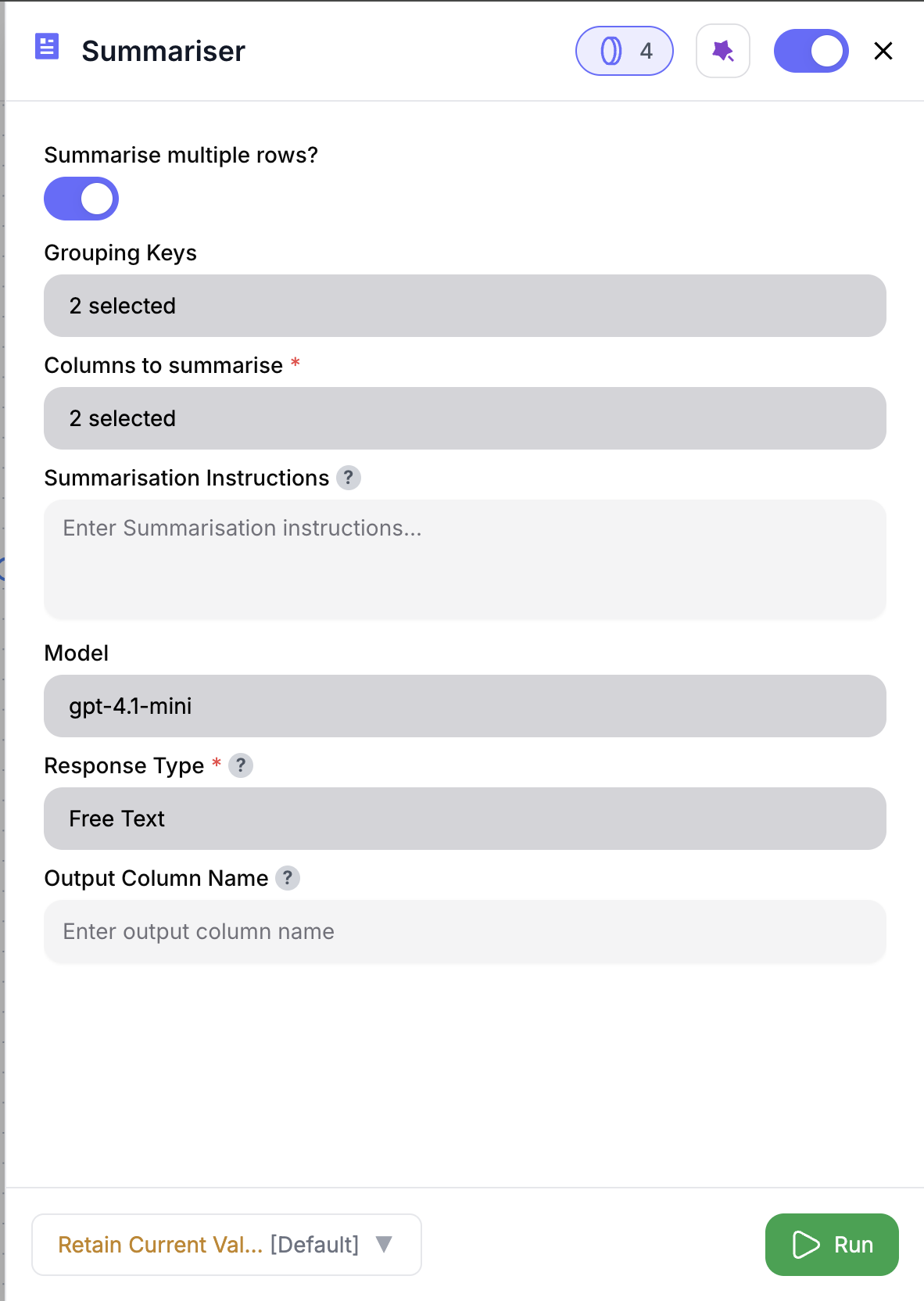 Drag the **Text Summariser** node into your workflow.
Select one or more text columns—like `@feedback`, `@notes`, or `@call_transcript`.
Toggle **Summarise Multiple Rows** to summarise grouped data.
Select columns like `@account_id`, `@session_id`, or `@date` to group by.
Tailor the summary (e.g., “Summarise for the sales team” or “List key takeaways”).
You’ll get clean, concise summaries per row—or per group.
***
## Inputs
### 🛠️ Required Fields
* **Columns to Summarise (✅)**\
One or more text fields to include in the summary.\
*Why it matters:* These columns will be merged (if multiple) and sent to the AI.
### 🎯 Optional Fields
* **Summarise Multiple Rows (⚪️)**\
Toggle to enable grouped summarisation.
* **Grouping Keys (⚪️)**\
Used when summarising multiple rows.\
Example: `@account_id`, `@meeting_id`
* **Summarisation Instruction (⚪️)**\
Optional guidance like “Summarise in 2–3 bullets for execs” or “List issues and action items”.
* **Output Column Name (⚪️)**\
Default: `SUMMARY`\
Choose a custom name like `call_digest` or `feedback_snippet` if preferred.
If a column named `SUMMARY` already exists, a suffix like `SUMMARY_1` or `SUMMARY_2` will be added automatically to prevent overwriting.
***
## Output
Depending on configuration:
* **Row-by-row mode**
* All original columns preserved
* Adds one summary column (auto-renamed if needed)
* **Grouped mode**
* Only `grouping_keys` + `SUMMARY` (or renamed) returned
* One summary per group
***
## How It Works
1. Validates your input selections
2. Merges text if multiple columns selected
3. Groups rows (if enabled)
4. Applies your custom instruction (or default)
5. Sends data to the AI for summarisation
6. Outputs new column(s) with summaries
***
## 🚀 Example Use Cases & Prompts
| Use Case | Setup Example |
| ------------------- | ---------------------------------------------------------- |
| Feedback Digest | Summarise `@feedback` per row |
| Meeting Recap | Group by `@meeting_id`, summarise `@notes` |
| Conversation Thread | Group by `@session_id`, summarise `@chat_log` |
| News Summary | Summarise each `@article_text` |
| Report TL;DR | Merge `@exec_summary` + `@analysis` and return one summary |
***
## ✨ Pro Tips
Use **Grouped Summarisation** for threads, sessions, or batched notes—it condenses 100s of rows into a clean, readable recap.
Tailor your summary with a prompt like “Summarise for support handoff” or “List top 3 themes.”
Rename your output to something specific—like `call_summary` or `digest`—to stay organized downstream.
***
## ⚠️ Important Considerations
**Grouped summarisation changes the output shape** — only `grouping_keys` + summary column are returned.
**Larger text blocks take longer** — long grouped transcripts or merged fields may increase processing time.
***
## 🛠 Troubleshooting & Gotchas
| Symptom | Likely Cause | Quick Fix |
| ---------------------- | ------------------------- | ----------------------------------------- |
| No summaries returned | Column not found or empty | Double-check your input selections |
| Missing group fields | Grouped mode is enabled | Only grouping keys + summary are returned |
| SUMMARY column missing | Name collision | Look for `SUMMARY_1`, `SUMMARY_2`, etc. |
***
## 📝 FAQ
Yes — the selected fields are merged before summarising.
Absolutely — enable **Summarise Multiple Rows** and set your `@grouping_keys`.
The output column will be auto-renamed to avoid conflicts.
***
## 💰 Pricing
> Each summary (row or group) consumes **2 credits**.
Credits are charged per summary generated—not per row processed.\
Example: 100 row summaries = 200 credits. 10 group summaries = 20 credits.
***
Drag the **Text Summariser** node into your workflow.
Select one or more text columns—like `@feedback`, `@notes`, or `@call_transcript`.
Toggle **Summarise Multiple Rows** to summarise grouped data.
Select columns like `@account_id`, `@session_id`, or `@date` to group by.
Tailor the summary (e.g., “Summarise for the sales team” or “List key takeaways”).
You’ll get clean, concise summaries per row—or per group.
***
## Inputs
### 🛠️ Required Fields
* **Columns to Summarise (✅)**\
One or more text fields to include in the summary.\
*Why it matters:* These columns will be merged (if multiple) and sent to the AI.
### 🎯 Optional Fields
* **Summarise Multiple Rows (⚪️)**\
Toggle to enable grouped summarisation.
* **Grouping Keys (⚪️)**\
Used when summarising multiple rows.\
Example: `@account_id`, `@meeting_id`
* **Summarisation Instruction (⚪️)**\
Optional guidance like “Summarise in 2–3 bullets for execs” or “List issues and action items”.
* **Output Column Name (⚪️)**\
Default: `SUMMARY`\
Choose a custom name like `call_digest` or `feedback_snippet` if preferred.
If a column named `SUMMARY` already exists, a suffix like `SUMMARY_1` or `SUMMARY_2` will be added automatically to prevent overwriting.
***
## Output
Depending on configuration:
* **Row-by-row mode**
* All original columns preserved
* Adds one summary column (auto-renamed if needed)
* **Grouped mode**
* Only `grouping_keys` + `SUMMARY` (or renamed) returned
* One summary per group
***
## How It Works
1. Validates your input selections
2. Merges text if multiple columns selected
3. Groups rows (if enabled)
4. Applies your custom instruction (or default)
5. Sends data to the AI for summarisation
6. Outputs new column(s) with summaries
***
## 🚀 Example Use Cases & Prompts
| Use Case | Setup Example |
| ------------------- | ---------------------------------------------------------- |
| Feedback Digest | Summarise `@feedback` per row |
| Meeting Recap | Group by `@meeting_id`, summarise `@notes` |
| Conversation Thread | Group by `@session_id`, summarise `@chat_log` |
| News Summary | Summarise each `@article_text` |
| Report TL;DR | Merge `@exec_summary` + `@analysis` and return one summary |
***
## ✨ Pro Tips
Use **Grouped Summarisation** for threads, sessions, or batched notes—it condenses 100s of rows into a clean, readable recap.
Tailor your summary with a prompt like “Summarise for support handoff” or “List top 3 themes.”
Rename your output to something specific—like `call_summary` or `digest`—to stay organized downstream.
***
## ⚠️ Important Considerations
**Grouped summarisation changes the output shape** — only `grouping_keys` + summary column are returned.
**Larger text blocks take longer** — long grouped transcripts or merged fields may increase processing time.
***
## 🛠 Troubleshooting & Gotchas
| Symptom | Likely Cause | Quick Fix |
| ---------------------- | ------------------------- | ----------------------------------------- |
| No summaries returned | Column not found or empty | Double-check your input selections |
| Missing group fields | Grouped mode is enabled | Only grouping keys + summary are returned |
| SUMMARY column missing | Name collision | Look for `SUMMARY_1`, `SUMMARY_2`, etc. |
***
## 📝 FAQ
Yes — the selected fields are merged before summarising.
Absolutely — enable **Summarise Multiple Rows** and set your `@grouping_keys`.
The output column will be auto-renamed to avoid conflicts.
***
## 💰 Pricing
> Each summary (row or group) consumes **2 credits**.
Credits are charged per summary generated—not per row processed.\
Example: 100 row summaries = 200 credits. 10 group summaries = 20 credits.
***
Turn long-form inputs into fast, usable insights. Great for call notes, feedback, and content distillation. 📝⚡