> ## Documentation Index
> Fetch the complete documentation index at: https://docs.nrev.ai/llms.txt
> Use this file to discover all available pages before exploring further.
# Filter Data
> Apply flexible filters to your dataset—combine conditions, use logic rules, and reference other columns to control what passes through.
## What It Does
* **Filters rows** based on one or more conditions
* **Combines filters using AND/OR logic**
* **Supports text, number, boolean, and blank checks**
* **Allows dynamic comparisons between columns**
* **Returns only the rows that match your rules** — with all columns intact
***
## 🏁 Getting Started
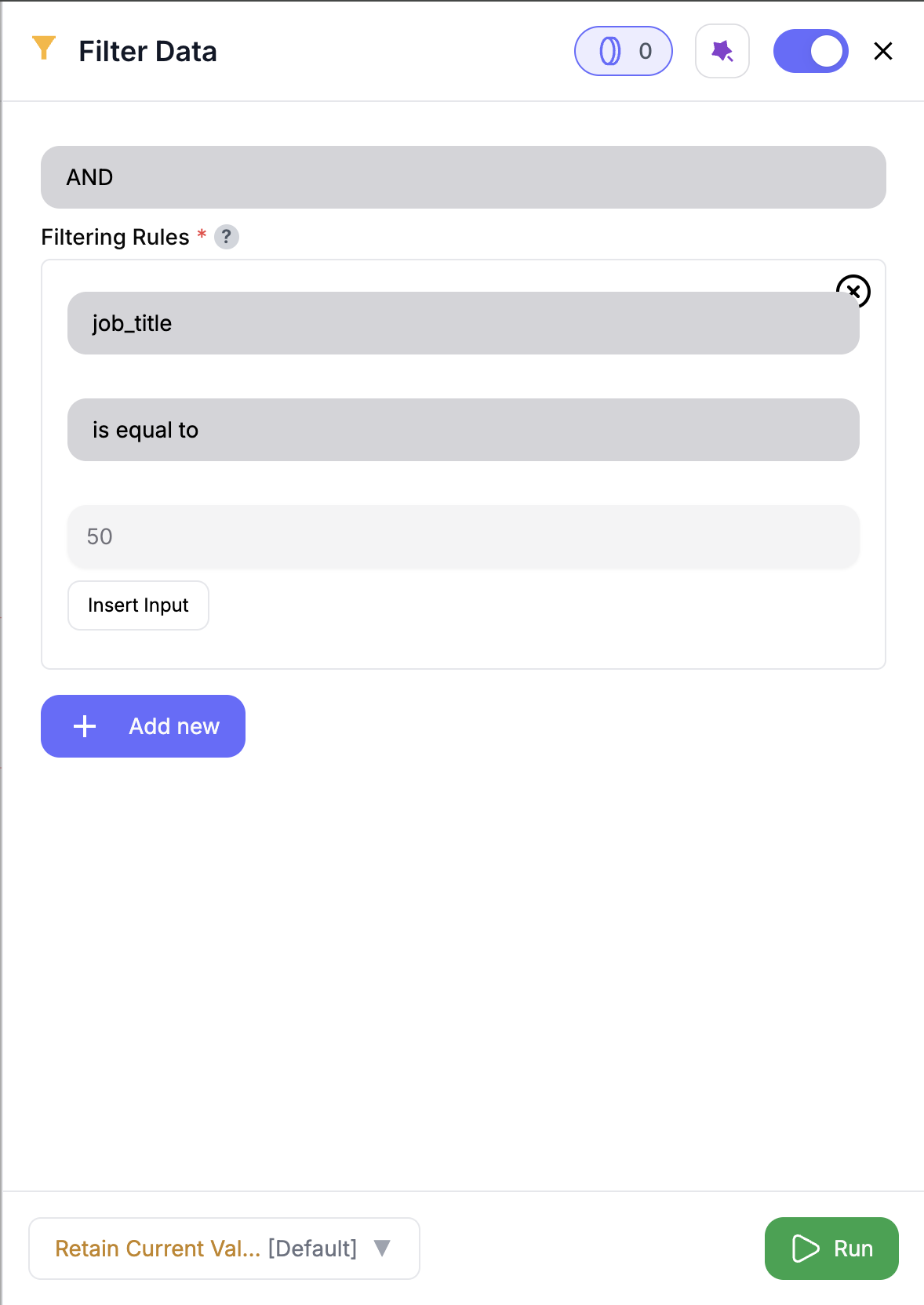 Drag in the **Filter Data** node from the panel.
Use any upstream node that outputs the dataset you'd like to filter.
Select a column, choose a condition (e.g., “is equal to”), and enter a value or reference another column.
Use **AND** to require all conditions to match, or **OR** to allow any.
The output will include only rows that pass your filters.
***
## Inputs
### 🛠️ Required Fields
* **Filter Logic (✅)**\
Choose whether filters are combined with `AND` or `OR`.\
*Why it matters:* Defines how strict or flexible the matching will be.
* **Filter Conditions (✅)**\
Add one or more conditions to define which rows should pass.\
*Why it matters:* Each condition filters your data by value or structure.
Only existing columns are available — missing fields are automatically excluded.
***
## Available Conditions
| Condition | Description |
| ------------------ | --------------------------------------------- |
| `is_equal_to` | Matches exactly to a given value |
| `is_not_equal_to` | Matches anything except a specific value |
| `is_greater_than` | Only allows rows with higher numeric values |
| `is_less_than` | Only allows rows with lower numeric values |
| `is_empty` | Matches blank or missing fields |
| `is_not_empty` | Matches any field that has a value |
| `is_true` | Matches `true` booleans |
| `is_false` | Matches `false` booleans |
| `contains` | Field includes a substring (case-insensitive) |
| `does_not_contain` | Field does **not** include a substring |
Use “value from another column” to create **row-level dynamic comparisons**.
***
## Output
Returns a filtered version of your dataset.
* All columns are preserved
* Row order remains unchanged
* Only rows that satisfy the rules will be passed forward
***
## How It Works
1. Loads your input data
2. Applies each condition to the selected column
3. Combines rules using AND or OR
4. Returns only matching rows
***
## 🚀 Example Use Cases & Prompts
| Use Case | Filter Example |
| ------------------------- | ------------------------------------------------------ |
| Clean out test records | `email contains test`, `status is not equal to active` |
| Filter by ICP segment | `tier is in Strategic,Enterprise` |
| Focus on high-score leads | `score is greater than 85` |
| Row-level match | `region equals value from assigned_region column` |
***
## ✨ Pro Tips
Use `is in` with comma-separated values (e.g., `IT,Marketing`) to include multiple options at once.
Reference other columns for powerful **row-level logic**—great for matching teams, regions, or reps dynamically.
Try OR logic to broaden results if you're getting too few matches.
***
## ⚠️ Important Considerations
Only columns from your input data can be used in filters—no risk of referencing a missing field.
Make sure the condition matches the field type: numeric filters for numbers, text filters for strings.
Dynamic comparisons only work when both columns exist in every row.
***
## 🛠 Troubleshooting & Gotchas
| Symptom | Likely Cause | Suggested Fix |
| ------------------------ | ---------------------------------------- | ------------------------------------- |
| No rows in output | Filters are too strict | Try OR logic or relax your conditions |
| “Type mismatch” error | Comparing number to text (or vice versa) | Update to compatible filter type |
| Dynamic rule not working | Referenced field doesn’t exist in a row | Adjust logic or use default fallback |
***
## 📝 FAQ
Yes — add as many as you need, and combine them with AND/OR logic.
Absolutely — select “value from another column” for dynamic comparisons.
Yes — use `is_empty` or `is_not_empty` to handle missing fields.
***
## 💰 Pricing
> The Filter Data node is **free** — no credits required.
***
Drag in the **Filter Data** node from the panel.
Use any upstream node that outputs the dataset you'd like to filter.
Select a column, choose a condition (e.g., “is equal to”), and enter a value or reference another column.
Use **AND** to require all conditions to match, or **OR** to allow any.
The output will include only rows that pass your filters.
***
## Inputs
### 🛠️ Required Fields
* **Filter Logic (✅)**\
Choose whether filters are combined with `AND` or `OR`.\
*Why it matters:* Defines how strict or flexible the matching will be.
* **Filter Conditions (✅)**\
Add one or more conditions to define which rows should pass.\
*Why it matters:* Each condition filters your data by value or structure.
Only existing columns are available — missing fields are automatically excluded.
***
## Available Conditions
| Condition | Description |
| ------------------ | --------------------------------------------- |
| `is_equal_to` | Matches exactly to a given value |
| `is_not_equal_to` | Matches anything except a specific value |
| `is_greater_than` | Only allows rows with higher numeric values |
| `is_less_than` | Only allows rows with lower numeric values |
| `is_empty` | Matches blank or missing fields |
| `is_not_empty` | Matches any field that has a value |
| `is_true` | Matches `true` booleans |
| `is_false` | Matches `false` booleans |
| `contains` | Field includes a substring (case-insensitive) |
| `does_not_contain` | Field does **not** include a substring |
Use “value from another column” to create **row-level dynamic comparisons**.
***
## Output
Returns a filtered version of your dataset.
* All columns are preserved
* Row order remains unchanged
* Only rows that satisfy the rules will be passed forward
***
## How It Works
1. Loads your input data
2. Applies each condition to the selected column
3. Combines rules using AND or OR
4. Returns only matching rows
***
## 🚀 Example Use Cases & Prompts
| Use Case | Filter Example |
| ------------------------- | ------------------------------------------------------ |
| Clean out test records | `email contains test`, `status is not equal to active` |
| Filter by ICP segment | `tier is in Strategic,Enterprise` |
| Focus on high-score leads | `score is greater than 85` |
| Row-level match | `region equals value from assigned_region column` |
***
## ✨ Pro Tips
Use `is in` with comma-separated values (e.g., `IT,Marketing`) to include multiple options at once.
Reference other columns for powerful **row-level logic**—great for matching teams, regions, or reps dynamically.
Try OR logic to broaden results if you're getting too few matches.
***
## ⚠️ Important Considerations
Only columns from your input data can be used in filters—no risk of referencing a missing field.
Make sure the condition matches the field type: numeric filters for numbers, text filters for strings.
Dynamic comparisons only work when both columns exist in every row.
***
## 🛠 Troubleshooting & Gotchas
| Symptom | Likely Cause | Suggested Fix |
| ------------------------ | ---------------------------------------- | ------------------------------------- |
| No rows in output | Filters are too strict | Try OR logic or relax your conditions |
| “Type mismatch” error | Comparing number to text (or vice versa) | Update to compatible filter type |
| Dynamic rule not working | Referenced field doesn’t exist in a row | Adjust logic or use default fallback |
***
## 📝 FAQ
Yes — add as many as you need, and combine them with AND/OR logic.
Absolutely — select “value from another column” for dynamic comparisons.
Yes — use `is_empty` or `is_not_empty` to handle missing fields.
***
## 💰 Pricing
> The Filter Data node is **free** — no credits required.
***
Filter with precision — apply logic, narrow results, and keep only what matters to your GTM plays.