> ## Documentation Index
> Fetch the complete documentation index at: https://docs.nrev.ai/llms.txt
> Use this file to discover all available pages before exploring further.
# If-Else
> Split your dataset into two clean streams — perfect for segmenting leads, triggering enrichments, or just cleaning things up.
## What It Does
* **Evaluates filter rules** row-by-row
* **Splits your dataset into two parts**:
* ✅ **If-True**: rows that meet your conditions
* ❌ **If-False**: rows that don't
* **Preserves all columns** in both outputs
* Enables conditional routing across your play
***
## 🏁 Getting Started
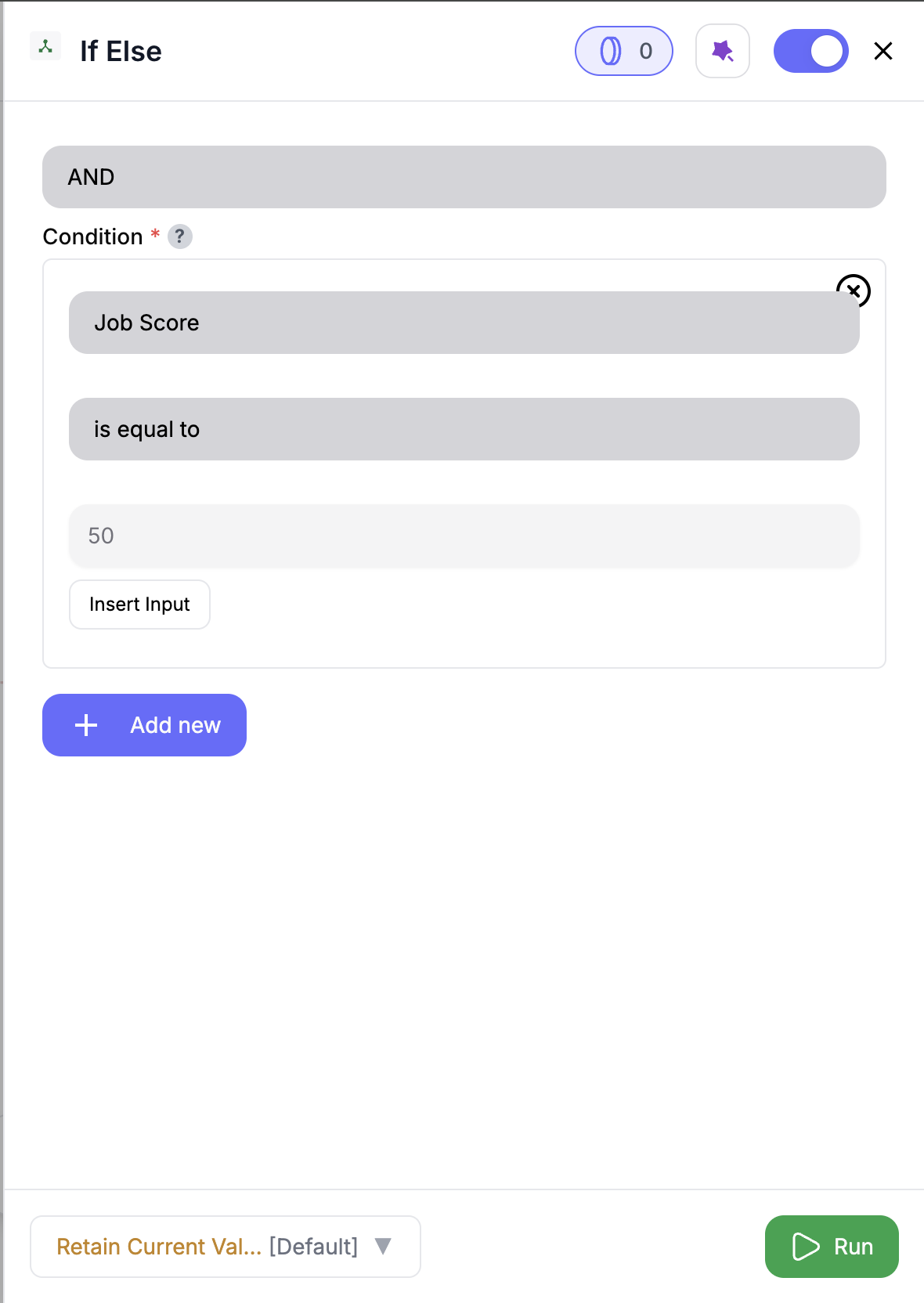 Drag in the **If-Else** node from the panel.
Select a filtering operator (**AND** or **OR**) and add your condition(s).
The node will return:
* ✅ If-True: rows that match your rules
* ❌ If-False: rows that don’t
***
## Inputs
### 🛠️ Required Fields
* **Condition Logic (✅)**\
Choose **AND** (all rules must match) or **OR** (any rule matches).\
*Why it matters:* Defines how your filters combine.
* **At Least One Filter Condition (✅)**\
Each condition includes:
* Column to check
* Rule type (e.g. `is_equal_to`)
* Value (if needed)\
*Why it matters:* This logic controls how your rows get routed.
***
## Output
Two outputs:
* ✅ **If-True:** All rows that satisfy your filter logic
* ❌ **If-False:** All rows that do not
Both outputs retain the full dataset schema — nothing is dropped.
***
## 🧠 Available Conditions
| Condition | Description |
| ------------------ | -------------------------------- |
| `is_equal_to` | Exact match |
| `is_not_equal_to` | Not equal to |
| `is_greater_than` | Greater than (numeric only) |
| `is_less_than` | Less than (numeric only) |
| `is_empty` | Field is blank or null |
| `is_not_empty` | Field contains data |
| `is_true` | Boolean is `true` |
| `is_false` | Boolean is `false` |
| `contains` | Field contains a specific string |
| `does_not_contain` | Field does not contain string |
***
## 🚀 Example Use Cases
| Scenario | Setup Example |
| --------------------------- | ----------------------------------------- |
| Segment Nrev AI contacts | `company is_equal_to Nrev AI` |
| Route high-value deals | `deal_size is_greater_than 10000` |
| Flag incomplete rows | `email is_empty` |
| Identify non-closed opps | `stage is_not_equal_to closed-won` |
| Separate Sayanta’s accounts | `owner_email is_equal_to sayanta@nrev.ai` |
***
## ✨ Pro Tips
Use **AND** to get surgical (e.g., `country = India` AND `tier = Strategic`); use **OR** to cast a wider net (e.g., `score > 90` OR `requested_demo = true`).
Connect both outputs to different downstream steps — like enrichment for one, and cleanup for the other.
***
## ⚠️ Important Considerations
One output empty? Totally normal — just means no rows met (or missed) the filter. Tweak logic if needed.
All columns are preserved. Only row selection changes — your schema stays the same.
Make sure your rule matches the data type — like using numbers for `is_greater_than`, not text.
***
## 🛠 Troubleshooting
| Symptom | Likely Cause | Fix |
| ---------------------- | ----------------------------- | ---------------------------------- |
| Both outputs are empty | No input or no conditions set | Add valid input and logic |
| One output is empty | All rows match one path | Adjust conditions for better split |
| “Invalid value” error | Type mismatch | Ensure values match column types |
***
## 📝 FAQ
Yes — add as many as needed, and select AND or OR to control how they combine.
Yep — use `is_empty` or `is_not_empty` to route those rows.
Yep — every row in both outputs keeps the full schema. Nothing gets dropped, just split.
Filter keeps only the rows you match. If-Else gives you both sides of the story — in two clean outputs.
***
## 💰 Pricing
> The If-Else node is **free** — no credits required.
***
Drag in the **If-Else** node from the panel.
Select a filtering operator (**AND** or **OR**) and add your condition(s).
The node will return:
* ✅ If-True: rows that match your rules
* ❌ If-False: rows that don’t
***
## Inputs
### 🛠️ Required Fields
* **Condition Logic (✅)**\
Choose **AND** (all rules must match) or **OR** (any rule matches).\
*Why it matters:* Defines how your filters combine.
* **At Least One Filter Condition (✅)**\
Each condition includes:
* Column to check
* Rule type (e.g. `is_equal_to`)
* Value (if needed)\
*Why it matters:* This logic controls how your rows get routed.
***
## Output
Two outputs:
* ✅ **If-True:** All rows that satisfy your filter logic
* ❌ **If-False:** All rows that do not
Both outputs retain the full dataset schema — nothing is dropped.
***
## 🧠 Available Conditions
| Condition | Description |
| ------------------ | -------------------------------- |
| `is_equal_to` | Exact match |
| `is_not_equal_to` | Not equal to |
| `is_greater_than` | Greater than (numeric only) |
| `is_less_than` | Less than (numeric only) |
| `is_empty` | Field is blank or null |
| `is_not_empty` | Field contains data |
| `is_true` | Boolean is `true` |
| `is_false` | Boolean is `false` |
| `contains` | Field contains a specific string |
| `does_not_contain` | Field does not contain string |
***
## 🚀 Example Use Cases
| Scenario | Setup Example |
| --------------------------- | ----------------------------------------- |
| Segment Nrev AI contacts | `company is_equal_to Nrev AI` |
| Route high-value deals | `deal_size is_greater_than 10000` |
| Flag incomplete rows | `email is_empty` |
| Identify non-closed opps | `stage is_not_equal_to closed-won` |
| Separate Sayanta’s accounts | `owner_email is_equal_to sayanta@nrev.ai` |
***
## ✨ Pro Tips
Use **AND** to get surgical (e.g., `country = India` AND `tier = Strategic`); use **OR** to cast a wider net (e.g., `score > 90` OR `requested_demo = true`).
Connect both outputs to different downstream steps — like enrichment for one, and cleanup for the other.
***
## ⚠️ Important Considerations
One output empty? Totally normal — just means no rows met (or missed) the filter. Tweak logic if needed.
All columns are preserved. Only row selection changes — your schema stays the same.
Make sure your rule matches the data type — like using numbers for `is_greater_than`, not text.
***
## 🛠 Troubleshooting
| Symptom | Likely Cause | Fix |
| ---------------------- | ----------------------------- | ---------------------------------- |
| Both outputs are empty | No input or no conditions set | Add valid input and logic |
| One output is empty | All rows match one path | Adjust conditions for better split |
| “Invalid value” error | Type mismatch | Ensure values match column types |
***
## 📝 FAQ
Yes — add as many as needed, and select AND or OR to control how they combine.
Yep — use `is_empty` or `is_not_empty` to route those rows.
Yep — every row in both outputs keeps the full schema. Nothing gets dropped, just split.
Filter keeps only the rows you match. If-Else gives you both sides of the story — in two clean outputs.
***
## 💰 Pricing
> The If-Else node is **free** — no credits required.
***
Branch your play with precision — split records into two smart streams and route them like a pro. 🔀