> ## Documentation Index
> Fetch the complete documentation index at: https://docs.nrev.ai/llms.txt
> Use this file to discover all available pages before exploring further.
# Sort Rows
> Sort your table by any column—ascending or descending—to control the order of your data.
## What It Does
* Sorts rows in your table based on a single selected column
* Supports text, number, and date columns
* Keeps your original structure and column names
* No columns are added, removed, or renamed
* Cleanly reorders your dataset for downstream logic
> 🔄 Whether you're teeing up your next filter or sequencing actions, this node helps you get your priorities straight.
***
## 🏁 Getting Started
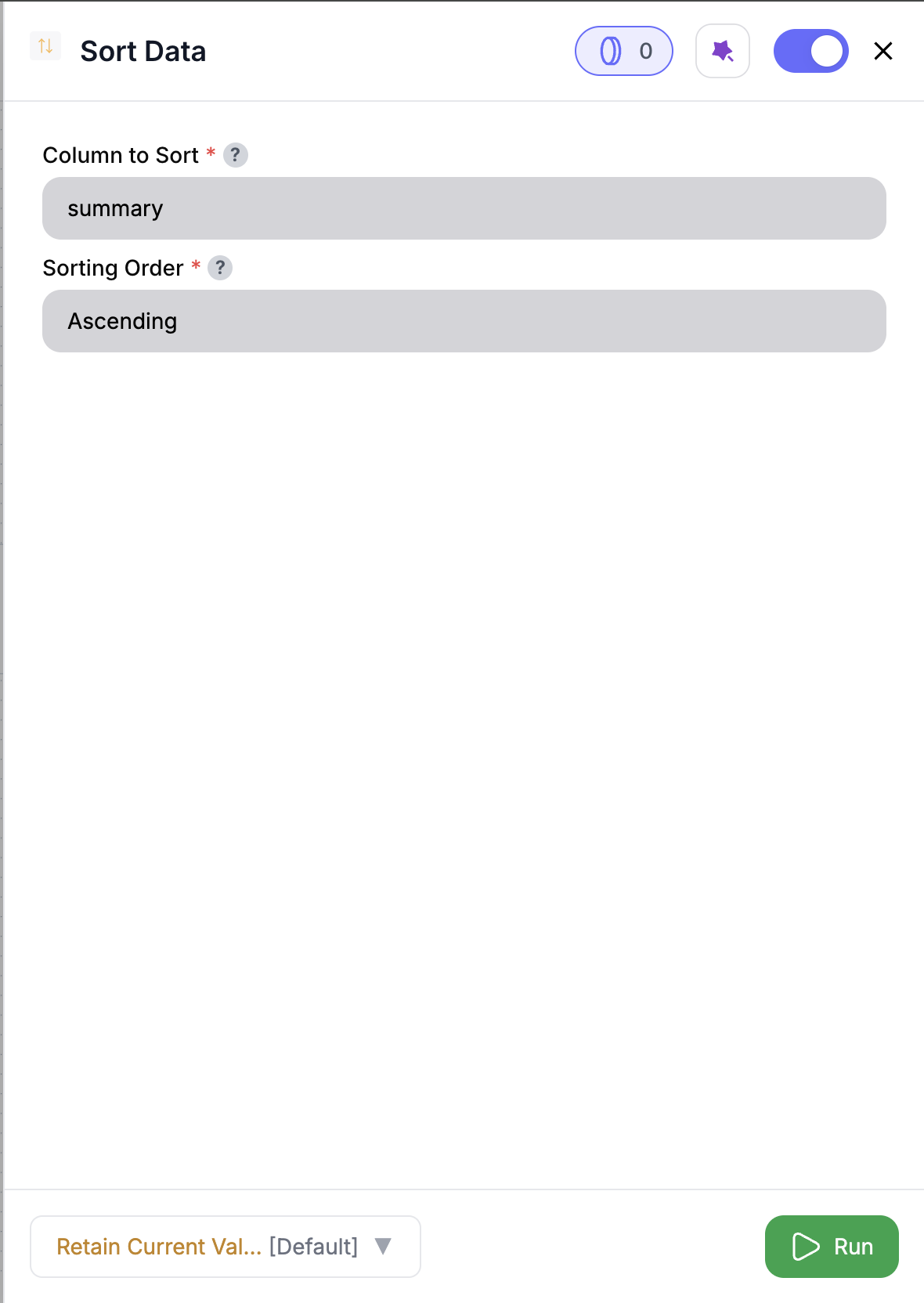 Drag the **Sort Rows** node into your canvas and connect your data.
Select a column from the dropdown—like `lead_score`, `created_at`, or `region`.
Choose **Ascending** (A→Z, 0→9) or **Descending** (Z→A, 9→0).
The output will be your same dataset, neatly reordered based on your choice.
***
## Inputs
### 🛠️ Required Fields
* **Column to Sort (✅)**\
Choose one column to sort by.\
*Why it matters:* This determines how your rows are ordered for next steps like filtering or ranking.
* **Sort Order (✅)**\
Choose `Ascending` or `Descending`.\
*Why it matters:* Controls whether high-priority leads rise to the top — or you surface older records first.
***
## Output
Returns a sorted version of your input dataset:
* All rows and columns are preserved
* The table is reordered based on your selected column and direction
* No new columns (like `sort_index`) are added
***
## 🚀 Example Use Cases
| Scenario | Setup Example |
| ------------------------------- | ------------------------------------ |
| Prioritize high-intent leads | Sort by `lead_score` (descending) |
| Display oldest activity first | Sort by `last_seen_at` (ascending) |
| Group data alphabetically | Sort by `company_name` (ascending) |
| Prep for deduplication or merge | Sort by `created_at` or `row_number` |
***
## ✨ Pro Tips
Use this node right before filtering to get top-N records, or to prepare clean groupings.
Need multi-level sorting? Chain multiple Sort nodes—each handles one level.
Sorting is stable: rows with equal values will maintain their relative position.
***
## ⚠️ Important Considerations
Only one column can be sorted per node. For multi-level sorts, stack Sort nodes in order.
Column must be selected from the dropdown. If upstream structure changes, you’ll get a UI error to reselect.
***
## 🛠 Troubleshooting
| Issue | Cause | Fix |
| ------------------------ | ------------------------------- | ----------------------------------------- |
| Output looks unsorted | Sort direction may be incorrect | Try toggling between ascending/descending |
| “Column not found” error | Column changed upstream | Reselect column from dropdown |
| Sort didn’t apply | Column not selected | Make sure both fields are set before run |
***
## 📝 FAQ
Nope. It simply reorders rows—no columns are added, dropped, or renamed.
Use multiple Sort nodes if you need multi-column sorting (e.g. region then score).
The UI will block the run until all required fields are filled.
***
## 💰 Pricing
> The Sort Rows node is **free** — no credits required.
***
Drag the **Sort Rows** node into your canvas and connect your data.
Select a column from the dropdown—like `lead_score`, `created_at`, or `region`.
Choose **Ascending** (A→Z, 0→9) or **Descending** (Z→A, 9→0).
The output will be your same dataset, neatly reordered based on your choice.
***
## Inputs
### 🛠️ Required Fields
* **Column to Sort (✅)**\
Choose one column to sort by.\
*Why it matters:* This determines how your rows are ordered for next steps like filtering or ranking.
* **Sort Order (✅)**\
Choose `Ascending` or `Descending`.\
*Why it matters:* Controls whether high-priority leads rise to the top — or you surface older records first.
***
## Output
Returns a sorted version of your input dataset:
* All rows and columns are preserved
* The table is reordered based on your selected column and direction
* No new columns (like `sort_index`) are added
***
## 🚀 Example Use Cases
| Scenario | Setup Example |
| ------------------------------- | ------------------------------------ |
| Prioritize high-intent leads | Sort by `lead_score` (descending) |
| Display oldest activity first | Sort by `last_seen_at` (ascending) |
| Group data alphabetically | Sort by `company_name` (ascending) |
| Prep for deduplication or merge | Sort by `created_at` or `row_number` |
***
## ✨ Pro Tips
Use this node right before filtering to get top-N records, or to prepare clean groupings.
Need multi-level sorting? Chain multiple Sort nodes—each handles one level.
Sorting is stable: rows with equal values will maintain their relative position.
***
## ⚠️ Important Considerations
Only one column can be sorted per node. For multi-level sorts, stack Sort nodes in order.
Column must be selected from the dropdown. If upstream structure changes, you’ll get a UI error to reselect.
***
## 🛠 Troubleshooting
| Issue | Cause | Fix |
| ------------------------ | ------------------------------- | ----------------------------------------- |
| Output looks unsorted | Sort direction may be incorrect | Try toggling between ascending/descending |
| “Column not found” error | Column changed upstream | Reselect column from dropdown |
| Sort didn’t apply | Column not selected | Make sure both fields are set before run |
***
## 📝 FAQ
Nope. It simply reorders rows—no columns are added, dropped, or renamed.
Use multiple Sort nodes if you need multi-column sorting (e.g. region then score).
The UI will block the run until all required fields are filled.
***
## 💰 Pricing
> The Sort Rows node is **free** — no credits required.
***
Clean order, clean play. Sort rows to spotlight what matters — and route with intent.