> ## Documentation Index
> Fetch the complete documentation index at: https://docs.nrev.ai/llms.txt
> Use this file to discover all available pages before exploring further.
# Get Comments By Person
> Fetch LinkedIn comments from a person's profile using LinkedIn RapidAPI, including engagement metrics and comment content.
## What It Does
* **Fetch LinkedIn Comments**: Retrieves comments from a person's LinkedIn profile using LinkedIn RapidAPI.
* **Engagement Metrics**: Provides detailed engagement data including the number of likes, comments, empathy reactions, and more.
* **Comment Content**: Fetches the actual comment text, along with metadata such as author and timestamp.
* **Batch Processing**: Supports batch processing via template variables to process multiple profiles at once.
* **Pagination Handling**: Automatically handles pagination for up to 250 comments.
* **Metadata**: Includes metadata such as the total number of reactions and whether a post was reshared.
***
## 🏁 Getting Started
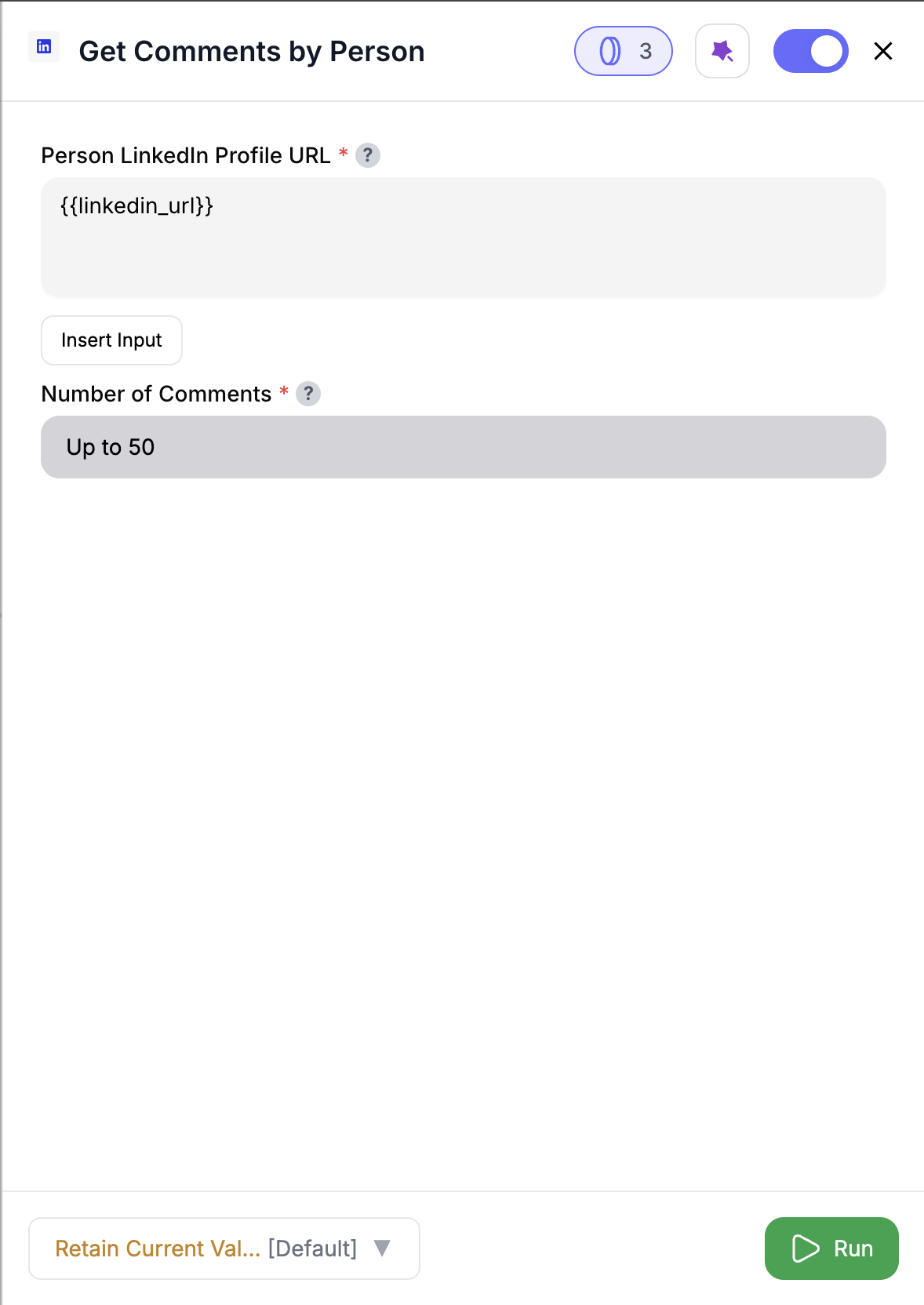 Drag and drop the node into your workflow to fetch LinkedIn comments.
Add the LinkedIn profile URL and define the limit for comments to fetch.
Execute the workflow to fetch LinkedIn comments based on the provided settings.
The output will include the comments, engagement metrics, and associated metadata in the DataFrame.
***
## Inputs
| Input Name | Type | Required | Description |
| ----------------- | --------------- | ----------------------------------- | ------------------------------------------------------------------------------------------------------------------- |
| `input_df_s3_url` | `Optional[str]` | Yes, if template variables are used | S3 URL to an input DataFrame (CSV/Parquet). Required when using template variables in settings for batch processing |
***
## Outputs
The node returns a **List\[Dict\[str, Any]]** where each dictionary contains:
| Output Name | Type | Description |
| ------------------- | ------ | ------------------------------------------------------------------------------------ |
| `s3_output_url` | `str` | S3 URL of the output DataFrame (Parquet format) |
| `s3_output_url_csv` | `str` | S3 URL of the output DataFrame (CSV format) |
| `file_info` | `Dict` | Contains metadata: `rows_count` (int), `columns_count` (int), `columns` (List\[str]) |
| `handle_condition` | `str` | Always returns `"default"` for this node |
### Output DataFrame Structure
The output DataFrame will contain the following LinkedIn comment fields:
* `person_comments`: Boolean indicating if the comment is highlighted (mapped from `highlighted_comments`)
* `urn`: LinkedIn URN identifier for the comment
* `posted`: Timestamp when the comment was posted
* `post_author`: LinkedIn URL of the comment author (mapped from `poster_linkedin_url`)
* `poster`: Author information object containing name and other details
* `post_url`: URL of the original post where the comment was made
* `text`: The actual comment text content
* `num_appreciations`: Number of appreciations on the comment
* `num_comments`: Number of replies to this comment
* `num_empathy`: Number of empathy reactions
* `num_entertainments`: Number of entertainment reactions
* `num_interests`: Number of interest reactions
* `num_likes`: Number of likes on the comment
* `num_praises`: Number of praise reactions
* `num_reactions`: Total number of reactions
* `num_reposts`: Number of reposts
* `reshared`: Boolean indicating if the post was reshared
* `resharer_comment`: Comment text if the post was reshared
**Note:** When input data is provided, all original columns are preserved and merged with the LinkedIn comment fields. Column name conflicts are resolved automatically using the column name resolution strategy.
***
## How It Works
1. **Data Loading**: Loads input data if provided using `data_loading_helper`.
2. **Processing**:
* Single or batch processing mode based on input.
* Template variables in LinkedIn URL are resolved and processed.
3. **API Interaction**: Calls LinkedIn RapidAPI for comment data fetching.
4. **Pagination**: Handles pagination automatically based on the specified limit (up to 250 comments).
5. **Credit Management**: Tracks credit consumption per page (5 credits per page).
6. **Output Generation**:
* Merges LinkedIn comment data with original input columns.
* Saves results in both Parquet and CSV formats to S3.
***
## 🚀 Example Use Cases & Prompts
| Use Case | Setup or Prompt Example |
| ------------------------- | --------------------------------------------------- |
| **Social Media Analysis** | Track engagement metrics for comments on a profile |
| **Competitor Research** | Fetch and analyze comments on competitor's posts |
| **Influencer Evaluation** | Analyze comments to gauge the influence of a person |
| **Sentiment Analysis** | Assess sentiment through comments and reactions |
***
## ✨ Pro Tips
Use **template variables** in `linkedin_url` to process multiple LinkedIn profiles in batch mode.
Keep an eye on **API rate limits** to avoid hitting credit limits. Consider limiting the number of comments fetched.
***
## ⚠️ Important Considerations
Requires **LinkedIn RapidAPI credentials** for authentication and data access.
Comments are fetched based on the limit setting (max 250 comments). If the limit exceeds 250, only the first 250 comments will be returned.
***
## 🛠 Troubleshooting & Gotchas
| Symptom | Likely Cause | Quick Fix |
| -------------------------- | ----------------------------------- | -------------------------------------------------------------- |
| **API Rate Limit Reached** | Too many requests in a short period | Wait for the rate limit reset or reduce the number of requests |
| **Invalid LinkedIn URL** | Malformed or incorrect URL | Double-check the LinkedIn URL format and ensure it’s valid |
| **Missing Comments** | Insufficient public comments | Check if the LinkedIn profile has public comments available |
***
## 📝 FAQ
Currently, only the **`linkedin_rapid_api`** vendor is supported for fetching LinkedIn comments.
Yes, by using **template variables** in the LinkedIn URL setting, you can fetch comments for multiple profiles in batch mode.
***
## 💰 Pricing
The **Get Comments By Person Node** incurs **5 credits** per page fetched from LinkedIn RapidAPI.
| Action | Credit Cost |
| ----------------- | ------------------ |
| Fetching comments | 5 credits per page |
Credits are consumed based on the number of pages fetched. A single page can return up to 50 comments.
***
Drag and drop the node into your workflow to fetch LinkedIn comments.
Add the LinkedIn profile URL and define the limit for comments to fetch.
Execute the workflow to fetch LinkedIn comments based on the provided settings.
The output will include the comments, engagement metrics, and associated metadata in the DataFrame.
***
## Inputs
| Input Name | Type | Required | Description |
| ----------------- | --------------- | ----------------------------------- | ------------------------------------------------------------------------------------------------------------------- |
| `input_df_s3_url` | `Optional[str]` | Yes, if template variables are used | S3 URL to an input DataFrame (CSV/Parquet). Required when using template variables in settings for batch processing |
***
## Outputs
The node returns a **List\[Dict\[str, Any]]** where each dictionary contains:
| Output Name | Type | Description |
| ------------------- | ------ | ------------------------------------------------------------------------------------ |
| `s3_output_url` | `str` | S3 URL of the output DataFrame (Parquet format) |
| `s3_output_url_csv` | `str` | S3 URL of the output DataFrame (CSV format) |
| `file_info` | `Dict` | Contains metadata: `rows_count` (int), `columns_count` (int), `columns` (List\[str]) |
| `handle_condition` | `str` | Always returns `"default"` for this node |
### Output DataFrame Structure
The output DataFrame will contain the following LinkedIn comment fields:
* `person_comments`: Boolean indicating if the comment is highlighted (mapped from `highlighted_comments`)
* `urn`: LinkedIn URN identifier for the comment
* `posted`: Timestamp when the comment was posted
* `post_author`: LinkedIn URL of the comment author (mapped from `poster_linkedin_url`)
* `poster`: Author information object containing name and other details
* `post_url`: URL of the original post where the comment was made
* `text`: The actual comment text content
* `num_appreciations`: Number of appreciations on the comment
* `num_comments`: Number of replies to this comment
* `num_empathy`: Number of empathy reactions
* `num_entertainments`: Number of entertainment reactions
* `num_interests`: Number of interest reactions
* `num_likes`: Number of likes on the comment
* `num_praises`: Number of praise reactions
* `num_reactions`: Total number of reactions
* `num_reposts`: Number of reposts
* `reshared`: Boolean indicating if the post was reshared
* `resharer_comment`: Comment text if the post was reshared
**Note:** When input data is provided, all original columns are preserved and merged with the LinkedIn comment fields. Column name conflicts are resolved automatically using the column name resolution strategy.
***
## How It Works
1. **Data Loading**: Loads input data if provided using `data_loading_helper`.
2. **Processing**:
* Single or batch processing mode based on input.
* Template variables in LinkedIn URL are resolved and processed.
3. **API Interaction**: Calls LinkedIn RapidAPI for comment data fetching.
4. **Pagination**: Handles pagination automatically based on the specified limit (up to 250 comments).
5. **Credit Management**: Tracks credit consumption per page (5 credits per page).
6. **Output Generation**:
* Merges LinkedIn comment data with original input columns.
* Saves results in both Parquet and CSV formats to S3.
***
## 🚀 Example Use Cases & Prompts
| Use Case | Setup or Prompt Example |
| ------------------------- | --------------------------------------------------- |
| **Social Media Analysis** | Track engagement metrics for comments on a profile |
| **Competitor Research** | Fetch and analyze comments on competitor's posts |
| **Influencer Evaluation** | Analyze comments to gauge the influence of a person |
| **Sentiment Analysis** | Assess sentiment through comments and reactions |
***
## ✨ Pro Tips
Use **template variables** in `linkedin_url` to process multiple LinkedIn profiles in batch mode.
Keep an eye on **API rate limits** to avoid hitting credit limits. Consider limiting the number of comments fetched.
***
## ⚠️ Important Considerations
Requires **LinkedIn RapidAPI credentials** for authentication and data access.
Comments are fetched based on the limit setting (max 250 comments). If the limit exceeds 250, only the first 250 comments will be returned.
***
## 🛠 Troubleshooting & Gotchas
| Symptom | Likely Cause | Quick Fix |
| -------------------------- | ----------------------------------- | -------------------------------------------------------------- |
| **API Rate Limit Reached** | Too many requests in a short period | Wait for the rate limit reset or reduce the number of requests |
| **Invalid LinkedIn URL** | Malformed or incorrect URL | Double-check the LinkedIn URL format and ensure it’s valid |
| **Missing Comments** | Insufficient public comments | Check if the LinkedIn profile has public comments available |
***
## 📝 FAQ
Currently, only the **`linkedin_rapid_api`** vendor is supported for fetching LinkedIn comments.
Yes, by using **template variables** in the LinkedIn URL setting, you can fetch comments for multiple profiles in batch mode.
***
## 💰 Pricing
The **Get Comments By Person Node** incurs **5 credits** per page fetched from LinkedIn RapidAPI.
| Action | Credit Cost |
| ----------------- | ------------------ |
| Fetching comments | 5 credits per page |
Credits are consumed based on the number of pages fetched. A single page can return up to 50 comments.
***
Start scraping LinkedIn comments and track engagement effortlessly! 🚀