> ## Documentation Index
> Fetch the complete documentation index at: https://docs.nrev.ai/llms.txt
> Use this file to discover all available pages before exploring further.
# Get Reactions By Person
> Fetch reactions a person has made on LinkedIn posts — to understand their activity, engagement, and affinities.
## What It Does
* Pulls **all posts a person has reacted to** on LinkedIn.
* Captures **reaction type** (like, celebrate, love, etc.) and **post details**.
* Adds **author info** for each reacted-to post.
* Works for **single profile URLs** or **batch mode via input columns**.
***
## 🏁 Getting Started
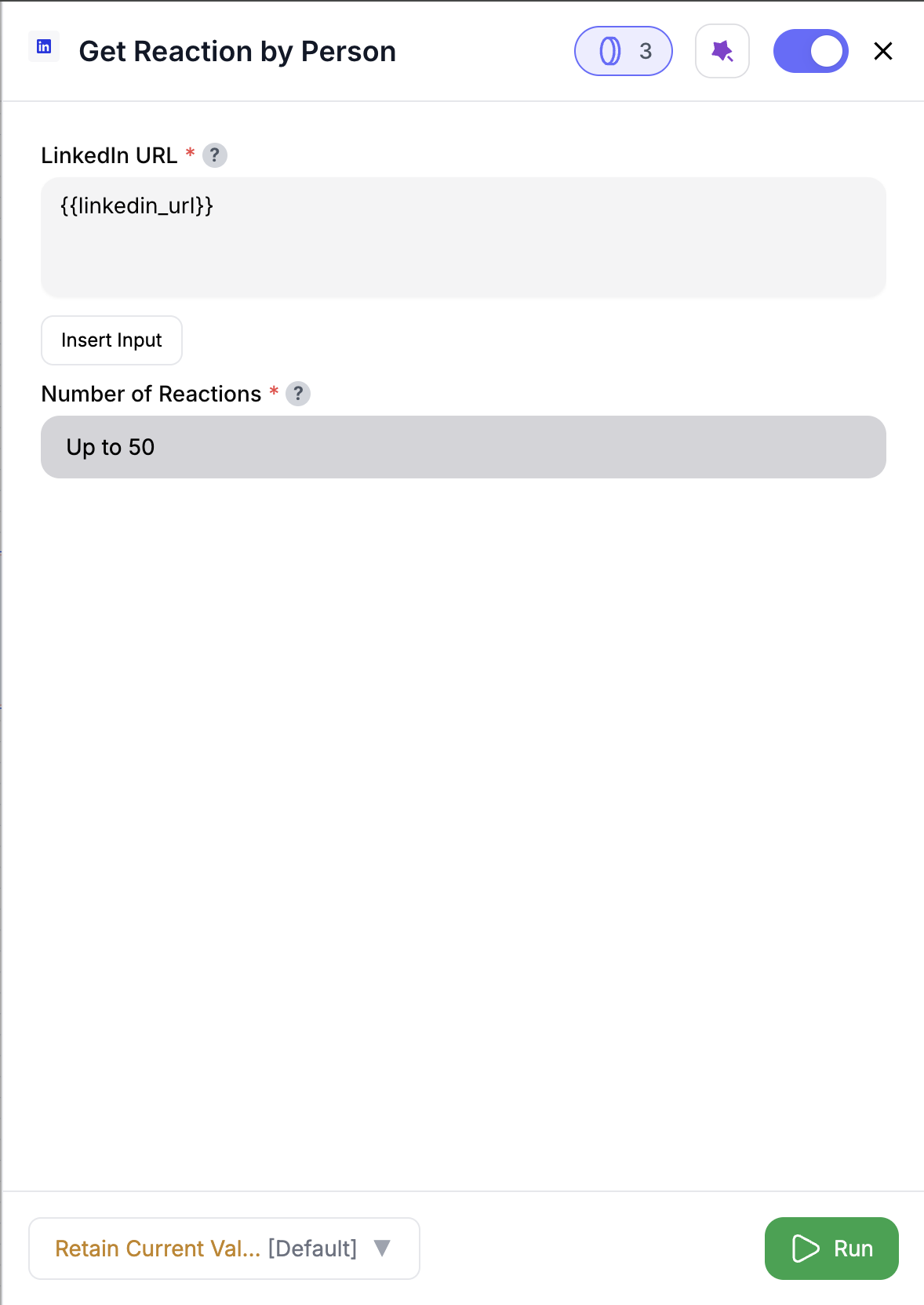 Drag **Get Reactions By Person** into your workflow.
Paste a LinkedIn profile URL, or map one from your data using **@** or **Insert Input**.
Choose how many reactions to fetch **(50–250, default = 50)**.
Enriched reactions appear alongside your input data.
***
## Inputs
### 🛠️ Required Fields
* **LinkedIn Profile URL (✅)**\
The LinkedIn profile to fetch reactions from.\
You can reference a column from your input data by:
* Typing **@** to open the column menu, or
* Clicking **Insert Input** to choose from previous nodes.\
*Why it matters:* Defines whose reactions you’re capturing.
* **Limit (✅)**\
Default: `50`. Maximum reactions to fetch per profile. **Range: 50–250.**\
*Why it matters:* Controls how much history you pull and how many credits are used.
***
## Output
Each row is enriched with the person’s reactions, including:
* `reaction_type` — Type of reaction (LIKE, CELEBRATE, LOVE, etc.)
* `post_url` — URL of the post they reacted to
* `post_text` — Text content of that post
* `post_author` — Author of the post (renamed from `poster_linkedin_url`)
✨ Original input columns are always preserved. If names clash, new ones are suffixed automatically (e.g., `post_url_1`).
***
## How It Works
1. Reads the **LinkedIn profile URL** (direct input or via **@ / Insert Input**).
2. Fetches reactions in **pages of 50** until the `limit` is reached.
3. Collects details about both the **reaction** and the **post it was made on**.
4. Renames `poster_linkedin_url` ➝ `post_author` for clarity.
5. Preserves your original dataset and appends new reaction columns.
***
## 🚀 Example Use Cases & Prompts
| Use Case | Setup Example |
| ---------------------- | ---------------------------------------------------------- |
| Buyer Intent Tracking | See what posts a prospect has engaged with recently |
| Competitive Intel | Monitor execs reacting to competitor announcements |
| Thought Leader Mapping | Spot leaders reacting to niche topics in your market |
| ABM Enrichment | Add reaction history to target accounts’ buying committees |
***
## ✨ Pro Tips
* Use this node with **Search People** ➝ **Get Reactions By Person** to instantly see how a whole list of prospects are engaging on LinkedIn.
* Keep `limit` closer for balance — more than that digs into older history, which may be less relevant.
***
## ⚠️ Important Considerations
* Each **page of 50 reactions = 5 credits**.
* If a person has fewer reactions than your limit, you’ll only get what’s available.
* Reaction visibility depends on LinkedIn’s data availability — not all activity is always exposed.
***
## 🛠 Troubleshooting & Gotchas
| Symptom | Likely Cause | Quick Fix |
| ----------------------- | --------------------------------------------------------- | ------------------------------------------------- |
| No reactions returned | Profile URL invalid or no data | Double-check LinkedIn URL, or try another profile |
| Less data than expected | Limit too high or not enough history | Reduce limit or confirm person’s activity |
| Column names suffixed | Conflict with input data | Rename columns upstream for clarity |
| Run stops early | Credits exhausted or may the a person has fewer reactions | Refill credits and re-run |
***
## 📝 FAQ
Yes — just map the **LinkedIn Profile URL** from an input column using **@** or **Insert Input**.
Up to **250 reactions** (5 pages of 50 each).
No — use **Get Post Reactors** for that. This node shows what posts a **person** has reacted to.
***
## 💰 Pricing
| Action | Credit Cost |
| --------------------------- | ------------- |
| Fetch 1 page (50 reactions) | **5 credits** |
Credits are charged **per page of 50 reactions**.
***
Drag **Get Reactions By Person** into your workflow.
Paste a LinkedIn profile URL, or map one from your data using **@** or **Insert Input**.
Choose how many reactions to fetch **(50–250, default = 50)**.
Enriched reactions appear alongside your input data.
***
## Inputs
### 🛠️ Required Fields
* **LinkedIn Profile URL (✅)**\
The LinkedIn profile to fetch reactions from.\
You can reference a column from your input data by:
* Typing **@** to open the column menu, or
* Clicking **Insert Input** to choose from previous nodes.\
*Why it matters:* Defines whose reactions you’re capturing.
* **Limit (✅)**\
Default: `50`. Maximum reactions to fetch per profile. **Range: 50–250.**\
*Why it matters:* Controls how much history you pull and how many credits are used.
***
## Output
Each row is enriched with the person’s reactions, including:
* `reaction_type` — Type of reaction (LIKE, CELEBRATE, LOVE, etc.)
* `post_url` — URL of the post they reacted to
* `post_text` — Text content of that post
* `post_author` — Author of the post (renamed from `poster_linkedin_url`)
✨ Original input columns are always preserved. If names clash, new ones are suffixed automatically (e.g., `post_url_1`).
***
## How It Works
1. Reads the **LinkedIn profile URL** (direct input or via **@ / Insert Input**).
2. Fetches reactions in **pages of 50** until the `limit` is reached.
3. Collects details about both the **reaction** and the **post it was made on**.
4. Renames `poster_linkedin_url` ➝ `post_author` for clarity.
5. Preserves your original dataset and appends new reaction columns.
***
## 🚀 Example Use Cases & Prompts
| Use Case | Setup Example |
| ---------------------- | ---------------------------------------------------------- |
| Buyer Intent Tracking | See what posts a prospect has engaged with recently |
| Competitive Intel | Monitor execs reacting to competitor announcements |
| Thought Leader Mapping | Spot leaders reacting to niche topics in your market |
| ABM Enrichment | Add reaction history to target accounts’ buying committees |
***
## ✨ Pro Tips
* Use this node with **Search People** ➝ **Get Reactions By Person** to instantly see how a whole list of prospects are engaging on LinkedIn.
* Keep `limit` closer for balance — more than that digs into older history, which may be less relevant.
***
## ⚠️ Important Considerations
* Each **page of 50 reactions = 5 credits**.
* If a person has fewer reactions than your limit, you’ll only get what’s available.
* Reaction visibility depends on LinkedIn’s data availability — not all activity is always exposed.
***
## 🛠 Troubleshooting & Gotchas
| Symptom | Likely Cause | Quick Fix |
| ----------------------- | --------------------------------------------------------- | ------------------------------------------------- |
| No reactions returned | Profile URL invalid or no data | Double-check LinkedIn URL, or try another profile |
| Less data than expected | Limit too high or not enough history | Reduce limit or confirm person’s activity |
| Column names suffixed | Conflict with input data | Rename columns upstream for clarity |
| Run stops early | Credits exhausted or may the a person has fewer reactions | Refill credits and re-run |
***
## 📝 FAQ
Yes — just map the **LinkedIn Profile URL** from an input column using **@** or **Insert Input**.
Up to **250 reactions** (5 pages of 50 each).
No — use **Get Post Reactors** for that. This node shows what posts a **person** has reacted to.
***
## 💰 Pricing
| Action | Credit Cost |
| --------------------------- | ------------- |
| Fetch 1 page (50 reactions) | **5 credits** |
Credits are charged **per page of 50 reactions**.
***
Use this node to reveal what prospects and buyers are paying attention to on LinkedIn — and time your outreach perfectly. 🚀