> ## Documentation Index
> Fetch the complete documentation index at: https://docs.nrev.ai/llms.txt
> Use this file to discover all available pages before exploring further.
# Search LinkedIn Posts
> Discover and analyze LinkedIn posts by keyword, author, and time period—perfect for trend tracking, brand monitoring, and competitor research. Quickly surface the posts that matter most for GTM strategy, competitor insights, and industry trend analysis.
## What It Does
* Searches LinkedIn posts by keyword(s)
* Filters by author title and date range
* Sorts by *Latest* or *Top match*
* Supports **@ / Insert Input** for dynamic queries
* Preserves your input columns alongside post details
***
## 🏁 Getting Started
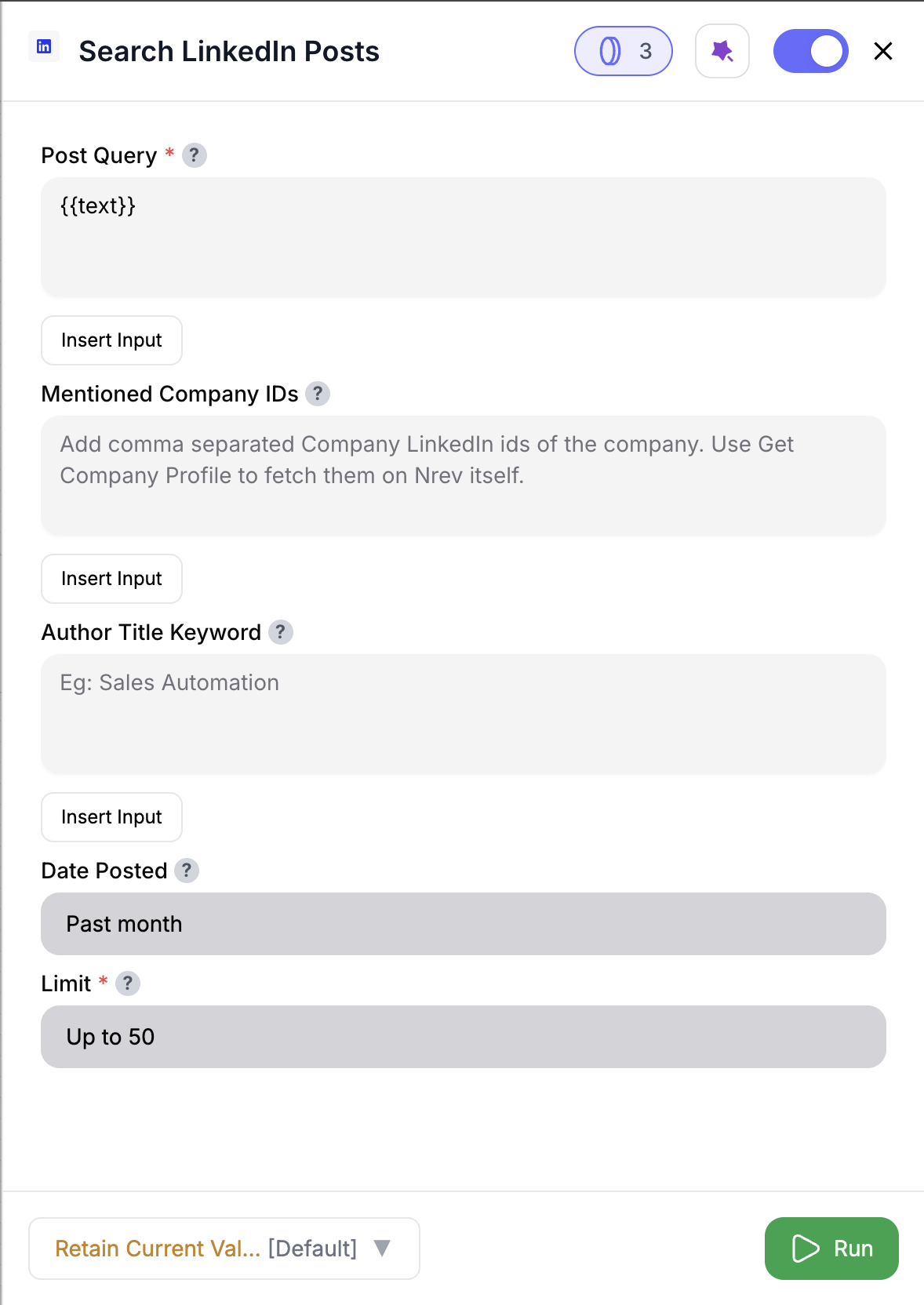 Drag **Search LinkedIn Posts** into your workflow.
Fill in **Post Query** (required). Example: *Rev Ops Automation*. You can also use **@ / Insert Input** to pull values from previous nodes.
Use **Author Title Keyword** to limit results (e.g., "CEO", "VP Sales").
Defaults to *Past month*. Choose from *Past 24h*, *Past week*, *Past month*, *Past year*, *Past 2y*, *Past 3y*.
Choose how many posts to fetch. Default is 50, allowed range is **50–250**.
Get a dataset of posts with author details, post text, and engagement metrics.
***
## Inputs
### 🛠️ Required Fields
* **Post Query (✅)**\
Main keyword(s) to search for. Example: *Sales Automation*.\
Supports **@** or **Insert Input** to reference a column from previous nodes.\
*Why it matters:* Defines which LinkedIn posts you’ll find.
* **Limit (✅)**\
Default: `50`.
*Why it matters:* Controls the number of posts fetched (and credits consumed).
***
### 🎯 Optional Fields
* **Author Title Keyword (⚪️)**\
Filter posts by author’s title/role (e.g., *CEO*, *Marketing Director*).\
*Why it matters:* Focuses results on specific job functions.
* **Date Posted (⚪️)**\
Defaults to *Past month*. Options: *Past 24h*, *Past week*, *Past month*, *Past year*, *Past 2y*, *Past 3y*.\
*Why it matters:* Ensures you’re analyzing content within the right time frame.
***
## Output
Each row returned is a LinkedIn post.
**Output Columns include:**
* `poster_linkedin_url` → Author’s LinkedIn profile
* `poster_name` → Full name
* `poster_title` → Author’s title/role
* `urn` → LinkedIn post URN
* `posted` → Timestamp when published
* `post_url` → Direct LinkedIn URL
* `text` → Post text content
* `num_likes` → Number of likes
* `num_comments` → Number of comments
✨ All your original input columns are preserved. If a column name already exists (e.g. `text`), the new one is suffixed automatically (`text_1`, `poster_name_1`, etc.).
***
## How It Works
1. You define keywords and filters (query, author, date, limit).
2. The node calls LinkedIn via RapidAPI and retrieves posts.
3. Pagination is handled automatically (50 posts per page).
4. Each page consumes credits (5 per 50 posts).
5. Results are merged with your input table.
6. Any column name conflicts are resolved with suffixes.
***
## 🚀 Example Use Cases & Prompts
| Use Case | Setup Example |
| --------------------- | ------------------------------------------------------------------- |
| Trend analysis | Post Query = *“RevOps Automation”*, Date Posted = *Past 3y* |
| Competitor monitoring | Post Query = *@company\_name*, Limit = 100 |
| Lead generation | Post Query = *“funding announcement”*, Author Title Keyword = *CEO* |
| Brand monitoring | Post Query = *“{brand_name}”* (Insert Input from CRM) |
| Industry research | Post Query = *“machine learning trends”*, Sort by = *Top match* |
***
## ✨ Pro Tips
* Use **@column\_name** or **Insert Input** to run searches dynamically for each row (e.g., different companies or topics).
* Start with smaller limits (50–100) to save credits while testing.
* Apply **Date Posted** filters to cut noise and stay relevant.
***
## ⚠️ Important Considerations
* The minimum limit is 50.
* In **Test Mode**, the node only fetches 1 page (50 posts) regardless of your limit, and no credits are consumed.
***
## 🛠 Troubleshooting & Gotchas
| Symptom | Likely Cause | Quick Fix |
| --------------------------- | ------------------- | ---------------------------------- |
| No results returned | Too narrow keywords | Broaden search or remove filters |
| API key error | Missing/invalid key | Set up environment or re-enter key |
| Limit not applied correctly | Set below 50 | Use 50–250 as per UI requirements |
| Duplicate column conflict | Name collision | Look for suffixes like `text_1` |
***
## 📝 FAQ
No — LinkedIn RapidAPI caps results at 250 posts per query.
Yes — all your original columns remain, with LinkedIn fields added.
Only 50 posts are returned (1 page), and no credits are consumed.
***
## 💰 Pricing
| Action | Credit Cost |
| ------------------- | ----------- |
| Fetch per page (50) | 5 credits |
Credits are calculated per page (50 posts). Example: a 120-post limit uses 3 pages = 15 credits.
***
Drag **Search LinkedIn Posts** into your workflow.
Fill in **Post Query** (required). Example: *Rev Ops Automation*. You can also use **@ / Insert Input** to pull values from previous nodes.
Use **Author Title Keyword** to limit results (e.g., "CEO", "VP Sales").
Defaults to *Past month*. Choose from *Past 24h*, *Past week*, *Past month*, *Past year*, *Past 2y*, *Past 3y*.
Choose how many posts to fetch. Default is 50, allowed range is **50–250**.
Get a dataset of posts with author details, post text, and engagement metrics.
***
## Inputs
### 🛠️ Required Fields
* **Post Query (✅)**\
Main keyword(s) to search for. Example: *Sales Automation*.\
Supports **@** or **Insert Input** to reference a column from previous nodes.\
*Why it matters:* Defines which LinkedIn posts you’ll find.
* **Limit (✅)**\
Default: `50`.
*Why it matters:* Controls the number of posts fetched (and credits consumed).
***
### 🎯 Optional Fields
* **Author Title Keyword (⚪️)**\
Filter posts by author’s title/role (e.g., *CEO*, *Marketing Director*).\
*Why it matters:* Focuses results on specific job functions.
* **Date Posted (⚪️)**\
Defaults to *Past month*. Options: *Past 24h*, *Past week*, *Past month*, *Past year*, *Past 2y*, *Past 3y*.\
*Why it matters:* Ensures you’re analyzing content within the right time frame.
***
## Output
Each row returned is a LinkedIn post.
**Output Columns include:**
* `poster_linkedin_url` → Author’s LinkedIn profile
* `poster_name` → Full name
* `poster_title` → Author’s title/role
* `urn` → LinkedIn post URN
* `posted` → Timestamp when published
* `post_url` → Direct LinkedIn URL
* `text` → Post text content
* `num_likes` → Number of likes
* `num_comments` → Number of comments
✨ All your original input columns are preserved. If a column name already exists (e.g. `text`), the new one is suffixed automatically (`text_1`, `poster_name_1`, etc.).
***
## How It Works
1. You define keywords and filters (query, author, date, limit).
2. The node calls LinkedIn via RapidAPI and retrieves posts.
3. Pagination is handled automatically (50 posts per page).
4. Each page consumes credits (5 per 50 posts).
5. Results are merged with your input table.
6. Any column name conflicts are resolved with suffixes.
***
## 🚀 Example Use Cases & Prompts
| Use Case | Setup Example |
| --------------------- | ------------------------------------------------------------------- |
| Trend analysis | Post Query = *“RevOps Automation”*, Date Posted = *Past 3y* |
| Competitor monitoring | Post Query = *@company\_name*, Limit = 100 |
| Lead generation | Post Query = *“funding announcement”*, Author Title Keyword = *CEO* |
| Brand monitoring | Post Query = *“{brand_name}”* (Insert Input from CRM) |
| Industry research | Post Query = *“machine learning trends”*, Sort by = *Top match* |
***
## ✨ Pro Tips
* Use **@column\_name** or **Insert Input** to run searches dynamically for each row (e.g., different companies or topics).
* Start with smaller limits (50–100) to save credits while testing.
* Apply **Date Posted** filters to cut noise and stay relevant.
***
## ⚠️ Important Considerations
* The minimum limit is 50.
* In **Test Mode**, the node only fetches 1 page (50 posts) regardless of your limit, and no credits are consumed.
***
## 🛠 Troubleshooting & Gotchas
| Symptom | Likely Cause | Quick Fix |
| --------------------------- | ------------------- | ---------------------------------- |
| No results returned | Too narrow keywords | Broaden search or remove filters |
| API key error | Missing/invalid key | Set up environment or re-enter key |
| Limit not applied correctly | Set below 50 | Use 50–250 as per UI requirements |
| Duplicate column conflict | Name collision | Look for suffixes like `text_1` |
***
## 📝 FAQ
No — LinkedIn RapidAPI caps results at 250 posts per query.
Yes — all your original columns remain, with LinkedIn fields added.
Only 50 posts are returned (1 page), and no credits are consumed.
***
## 💰 Pricing
| Action | Credit Cost |
| ------------------- | ----------- |
| Fetch per page (50) | 5 credits |
Credits are calculated per page (50 posts). Example: a 120-post limit uses 3 pages = 15 credits.
***
Drop this node into your flow to uncover LinkedIn insights, track competitors, and surface high-value posts automatically. 🚀